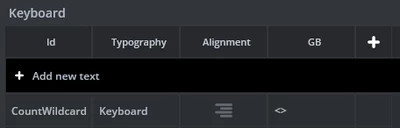
Solved
Update textArea's wildcard programatically inside keyboard
Hi again,
I'm looking to implement a character limit on a keyboard, as seen by the red 30/30 text in the screen below.
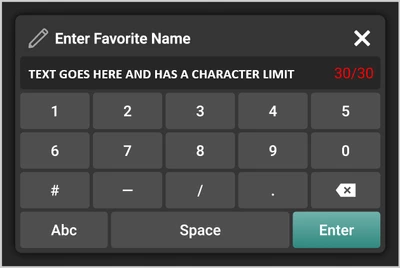
In CustomKeyboard.hpp I added:
 /**
 * The buffer used to hold the ASCII representation of the key count (e.g., "5/30").
 */
 Unicode::UnicodeChar keyCountTextAreaBuffer[KEYCOUNTTEXTAREA_SIZE];

 /**
 * Used to display the count of the characters entered / total allowed.
 */
 TextAreaWithOneWildcard keyCountTextArea;
And in CustomKeyboard.cpp there's some logic to add that textArea to the screen:
CustomKeyboard::CustomKeyboard() : keyboard(),
 keyCountTextArea(),
 modeBtnTextArea(),
 enterBtnTextArea(),
 capslockPressed(this, &CustomKeyboard::capslockPressedHandler),
 backspacePressed(this, &CustomKeyboard::backspacePressedHandler),
 modePressed(this, &CustomKeyboard::modePressedHandler),
 enterPressed(this, &CustomKeyboard::enterPressedHandler),
 keyPressed(this, &CustomKeyboard::keyPressedHandler),
 alphaKeys(true),
 uppercaseKeys(false),
 firstCharacterEntry(false)
{
 alphaLayout.callbackAreaArray[0].callback = &capslockPressed;
 alphaLayout.callbackAreaArray[1].callback = &backspacePressed;
 alphaLayout.callbackAreaArray[2].callback = &modePressed;
 alphaLayout.callbackAreaArray[3].callback = &enterPressed;

 numLayout.callbackAreaArray[0].callback = &backspacePressed;
 numLayout.callbackAreaArray[1].callback = &modePressed;
 numLayout.callbackAreaArray[2].callback = &enterPressed;

 keyboard.setLayout(&alphaLayout);
 keyboard.setKeyListener(keyPressed);
 keyboard.setPosition(0, 0, 480, 320);
 keyboard.setTextIndentation();

 memset(buffer, 0, sizeof(buffer));
 keyboard.setBuffer(buffer, BUFFER_SIZE);

 uppercaseKeys = true;
 firstCharacterEntry = true;

 keyCountTextArea.setPosition(FIRST_ROW_X + 386, ZEROETH_ROW_Y, ENTER_MODE_WIDTH, KEY_HEIGHT);
 keyCountTextArea.setColor(Color::getColorFromRGB(0xFF, 0xFF, 0xFF));

 modeBtnTextArea.setPosition(FIRST_ROW_X, FOURTH_ROW_Y + 8, ENTER_MODE_WIDTH, KEY_HEIGHT);
 modeBtnTextArea.setColor(Color::getColorFromRGB(0xFF, 0xFF, 0xFF));

 enterBtnTextArea.setPosition(ENTER_X, FOURTH_ROW_Y + 8, ENTER_MODE_WIDTH, KEY_HEIGHT);
 enterBtnTextArea.setColor(Color::getColorFromRGB(0xFF, 0xFF, 0xFF));
 enterBtnTextArea.setTypedText(TypedText(T_ENTER));

 setKeyMappingList();

 add(keyboard);
 add(keyCountTextArea);
 add(modeBtnTextArea);
 add(enterBtnTextArea);
}
And then I have the following function which implements the logic for key counting:
void CustomKeyboard::updateKeyCount()
{
 int keyCount = keyboard.getBufferPosition();

 Unicode::snprintf(keyCountTextAreaBuffer, sizeof(keyCountTextAreaBuffer), "%u/%u", keyCount, BUFFER_SIZE - 1);
 if (keyCount >= BUFFER_SIZE - 1)
 {
 keyCountTextArea.setColor(Color::getColorFromRGB(0xFF, 0x00, 0x00));
 }
 else
 {
 keyCountTextArea.setColor(Color::getColorFromRGB(0xFF, 0xFF, 0xFF));
 }
 keyCountTextArea.setWildcard(keyCountTextAreaBuffer);
 keyCountTextArea.invalidate();
}
I call this function from `keyPressedHandler` and `backspacePressedHandler`, however I never see the text appear.
I tried adding some logic that conditionally determines which TypedText to display in the textArea, and that works fine.
void CustomKeyboard::updateKeyCount()
{
 int keyCount = keyboard.getBufferPosition();

 if (keyCount >= BUFFER_SIZE - 1)
 {
 keyCountTextArea.setTypedText(TypedText(T_HITLIMIT));
 }
 else
 {
 keyCountTextArea.setTypedText(TypedText(T_ALLGOOD));
 }
 keyCountTextArea.invalidate();
}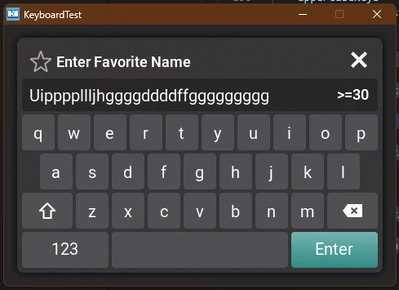
I must be doing something silly with wildcards! Any help is appreciated, thank you,
Julia