

Solved
Using while to wait after a button is clicked crashes the ui
Hi there Touchgfx team!
I have this UI requirement to pop up a progress bar after the "read" button is clicked
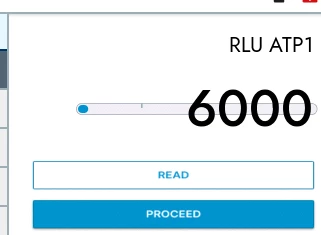
The progress bar will appear and go from 0 to 100 in 10 seconds. What I would like to do is that after the "read" button is clicked, I want to wait 10 seconds before continuing with the rest of the code. I tried a while but it crashes the UI. Here's my code:
void calibrateView::read_calibration_step_flex_button_is_clicked()
{
 if (test_selected == QGA)
 {
 /* 1. send calibration read step to backend to get the value, This step can be triggered several times*/
 int calibration_rlu_atp1_value = presenter->notify_backend_read_calibration_step();

 // start_rlu_progress_bar_animation = true;
 customProgressBar.setVisible(true);
 customProgressBar.invalidate();
 start_rlu_progress_bar_animation = true;

this is where I want to wait the 10 seconds

 Unicode::UnicodeChar tempBuffer[20];
 Unicode::snprintf(tempBuffer, 20, "%d", calibration_rlu_atp1_value);
 update_text_buffer(rlu_atp_value_textBuffer, tempBuffer, RLU_ATP_VALUE_TEXT_SIZE, rlu_atp_value_text);

 // Swap the X and Y positions of the two buttons
 update_button_position(read_calibration_step_flex_button, upper_button_x, upper_button_y);
 update_button_position(proceed_flex_button, bottom_button_x, bottom_button_y);

 update_button_state(proceed_flex_button, true, true);
 update_button_state(read_calibration_step_flex_button, false, true);
 }
}
Thanks a lot in advance