
Associate II
May 6, 2024
Solved

What is the maximum value the scroll list feature expands?

  • May 6, 2024
  • 2 replies
  • 1828 views

I'm using TouchGfx 4.21.3 for designing LCD screens for my project with ST Microcontroller. I have a requirement to have 4000 of value to use for scroll list and each element in scroll list is container. Can I make scroll list with 4000 items in it (scrollList1.setNumberOfItems(4000);)? 

How much is the maximum value that scroll list can expand?
This topic has been closed for replies.
Best answer by GaetanGodart

Hello @BhavyaSri and welcome to the TouchGFX community!


Setting the number of elements of a scroll list to 4000 in Designer doesn't seem to create any problem.

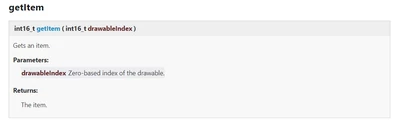
Indeed, in the documentation, on the API class of ScrollList (documentation_scroll_list), you can see that the get item method uses an int16 which is the limit of items you can create:

GaetanGodart_0-1715006185766.png

However, your MCU might probably not have enough memory to store 4000 custom containers containing each multiple widgets.

In that case, the solution is to only create a few widgets and as soon as the widgets gets out of view, display them again at the bottom. This way you have a limited number of items that can fit in your MCU's memory.


If this comment answer your question, I invite you to select it as "best answer".


Regards,

2 replies

GaetanGodart
GaetanGodartBest answer
Technical Moderator
May 6, 2024

Hello @BhavyaSri and welcome to the TouchGFX community!


Setting the number of elements of a scroll list to 4000 in Designer doesn't seem to create any problem.

Indeed, in the documentation, on the API class of ScrollList (documentation_scroll_list), you can see that the get item method uses an int16 which is the limit of items you can create:

GaetanGodart_0-1715006185766.png

However, your MCU might probably not have enough memory to store 4000 custom containers containing each multiple widgets.

In that case, the solution is to only create a few widgets and as soon as the widgets gets out of view, display them again at the bottom. This way you have a limited number of items that can fit in your MCU's memory.


If this comment answer your question, I invite you to select it as "best answer".


Regards,

BhavyaSriAuthor
Associate II
May 6, 2024

Thanks for quick response, will try with 4000. 

But how to do below part of your solution ?

"In that case, the solution is to only create a few widgets and as soon as the widgets gets out of view, display them again at the bottom. This way you have a limited number of items that can fit in your MCU's memory."


@GaetanGodart 

BhavyaSriAuthor
Associate II
May 6, 2024

Is there a parameter in touchgfx designer to set this ?

GaetanGodart
Technical Moderator
May 6, 2024

This is exactly what this user is trying to do : @I_ve_got_a_problem


Basically, you have to know how many of the widgets you can see in your scroll list.

For instance this can look something like that :

GaetanGodart_1-1715009945859.png

In that case, you can see a maximum of 4 elements.

I would use a scollable container because it has more useleful functions that allows to do what you want.

You can track how much the user have scrolled the container with the method getScrolledY().

You can get the index of the element that should be displayed the highest by doing : getScrolledY() / (widgetHeight + paddingY) (you have to round down with the function floor).

In the case the user have scrolled enought so that the first element is not visible anymore, then the index is getScrolledY() / (widgetHeight + paddingY) = 1.
Here is what it would look like:

GaetanGodart_2-1715010406856.png

Now that you know that the user have scrolled enough, you can modify the content of the first widget in your scrollable container. it means that you should keep the information stored somewhere. You could use a text file, this would take significantly less space than storing each 4000 widget.

Once you have updated the content of your widget, you have to position it at the right position which is the number of scrollable widgets + the index, in that case : 5.
You can do that with the method setY knowing that the position is 5, the coordinates would be (index - 1) * (widgetHeight + paddingY).


You would also have to make sure that it works when scrolling upwards instead of downwards.


This is a challenging and rewarding task but it is necessary when working on embedded devices with limited memories.


Regards,


BhavyaSriAuthor
Associate II
May 6, 2024

Thanks for the reply. I'll try this option and will back to you with the update.

GaetanGodart
Technical Moderator
May 8, 2024

Hello @BhavyaSri ,


I am glad I was able to help you.

I will be happy to help you on any issues that is TouchGFX related.

In the meantime, I invite you to check our online resources:

 - documentation : support.touchgfx.com/ 

 - tutorials : support.touchgfx.com/docs/category/tutorials 

 - technical videos : youtube.com/TechnicalVideosTouchGFX 


Regards,