
Associate III
September 14, 2024
Solved

Why is the display of my button control using TouchGFX not clear?

  • September 14, 2024
  • 6 replies
  • 2054 views

Hi

My project is using an alientek 4.3 inch TFTLCD screen, which is driven by FMC (Flexible Memory Controller).
And  ,The display effect of the button control does not meet my expectations after I load it.“next text”is my button,

that there are many horizontal dots or speckles inside。

thank you
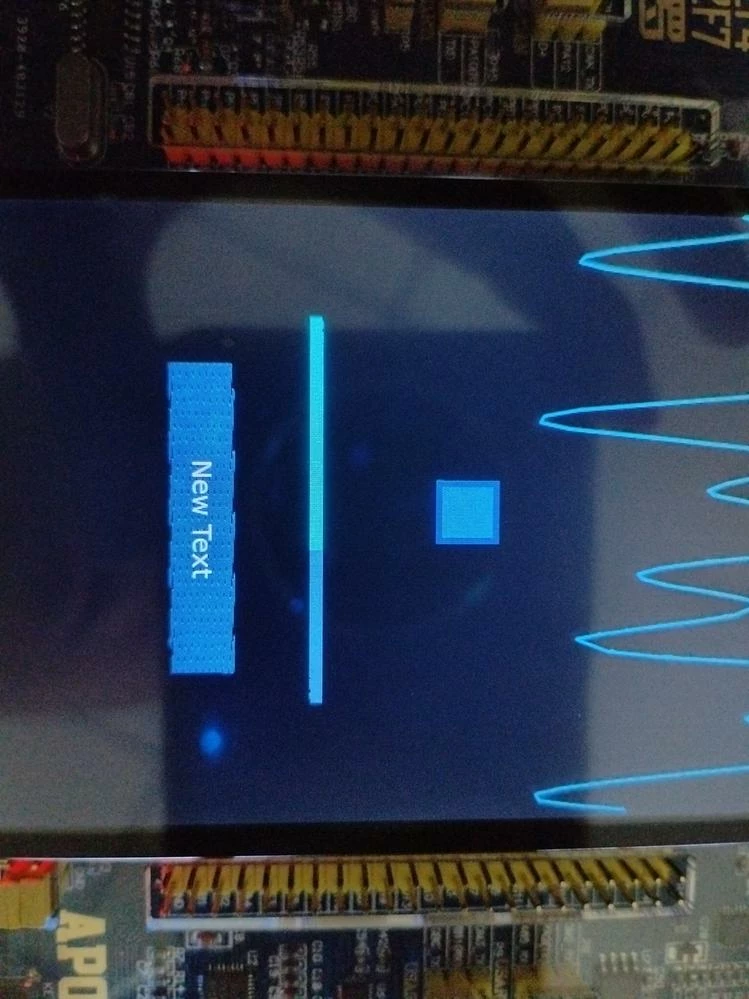


微信图片_20240914102946.jpg

Best answer by XD_it

It's hard to tell with limited information but i've had a very similar issue in the past.

It was caused by not moving/placing image assets in the external FMC flash during the flashing process. I had to write a "custom loader" to interface & place the images in external flash.

Another issue similar to this was memory bandwidth problems. I "clocked" the FMC memories to slow which resulted in a similar looking graphic glitch.

6 replies

GaetanGodart
Technical Moderator
September 16, 2024

Hello @zhaowhong and welcome to the community! :smiling_face_with_smiling_eyes:


It is usually quite hard to help people on hardware related issue.

Can you give me more information about your problem.
When does it occurs?
What happens if you move the button to another location?
What happens if you do not add the text? Do you still get the dots? The lines?
Are you using a flexButton or a button + a TextArea?


Regards,

mƎALLEm
Technical Moderator
September 16, 2024

+What STM32 product you are using?

"To give better visibility on the answered topics, please click on ""Accept as Solution"" on the reply which solved your issue or answered your question."
zhaowhongAuthor
Associate III
September 18, 2024

stm32F767

XD_it
XD_itBest answer
Associate III
September 18, 2024

It's hard to tell with limited information but i've had a very similar issue in the past.

It was caused by not moving/placing image assets in the external FMC flash during the flashing process. I had to write a "custom loader" to interface & place the images in external flash.

Another issue similar to this was memory bandwidth problems. I "clocked" the FMC memories to slow which resulted in a similar looking graphic glitch.

Osman SOYKURT
Technical Moderator
September 17, 2024

Hello @zhaowhong ,

Did you change the orientation of your screen in TouchGFX? Have you applied layout rotation on your image?

OsmanSOYKURT_0-1726568605256.png

OsmanSOYKURT_1-1726568678376.png

Osman SOYKURTST Software Developer | TouchGFX
zhaowhongAuthor
Associate III
September 18, 2024

thank you

 "I have not added any image."Is this related to not adding anything?" I found  if I select 

zhaowhong_0-1726620419134.png

 The display effect is well.


mƎALLEm
Technical Moderator
September 18, 2024

It could be also due to the speculative behavior of the cortex M7:

https://community.st.com/t5/stm32-mcus-products/m7-speculative-access-vs-cache/td-p/131916

https://community.st.com/t5/stm32-mcus-touchgfx-and-gui/screen-freezes-when-using-both-sdram-and-touchgfx-enabled/td-p/590334

In that case need to disable all the unused memory regions using MPU.

You can for example start by setting a Background MPU config to disable mainly all regions except the internal memory regions,  then enable the necessary external memories one by one. 

Example, refer to and see the MPU config: https://github.com/STMicroelectronics/STM32CubeF7/blob/master/Projects/STM32F769I_EVAL/Applications/Audio/Audio_playback_and_record/Src/main.c

This part is the MPU background config, then subsequent configs (not shown below) are to enable the necessary memory regions.


 /* Configure the MPU as Strongly ordered for not defined regions */
 MPU_InitStruct.Enable = MPU_REGION_ENABLE;
 MPU_InitStruct.BaseAddress = 0x00;
 MPU_InitStruct.Size = MPU_REGION_SIZE_4GB;
 MPU_InitStruct.AccessPermission = MPU_REGION_NO_ACCESS;
 MPU_InitStruct.IsBufferable = MPU_ACCESS_NOT_BUFFERABLE;
 MPU_InitStruct.IsCacheable = MPU_ACCESS_NOT_CACHEABLE;
 MPU_InitStruct.IsShareable = MPU_ACCESS_SHAREABLE;
 MPU_InitStruct.Number = MPU_REGION_NUMBER0;
 MPU_InitStruct.TypeExtField = MPU_TEX_LEVEL0;
 MPU_InitStruct.SubRegionDisable = 0x87;
 MPU_InitStruct.DisableExec = MPU_INSTRUCTION_ACCESS_DISABLE;


"To give better visibility on the answered topics, please click on ""Accept as Solution"" on the reply which solved your issue or answered your question."
GaetanGodart
Technical Moderator
October 8, 2024

Hello @zhaowhong ,


Can you quickly tell us how you solved the issue, this way, if someone else have the same issue and they find your post they can also fix their issue?
That would be very appreciated! :smiling_face_with_smiling_eyes:


Regards,