
why snprintf can't be applied for both textArea with the same variable value
I use STM32L431 to build a mainboard and LCD display, then develop the UI with touchGFX; From the button of mainboard to triggle and transfer to screw1.cpp, the number of textArea(picture:red 1 ) can increase when i press the buttom of mainboard, but number of textArea(picture:red2) can't any change and just display 00% with initial value; what was more, with the same code for the function of decrease, the function is ok that the number of textArea(picture :red2) can be visable and decrease when i pressed the buttom;
remark: increased and decreased number of center textArea is devided into 2 textAreas;
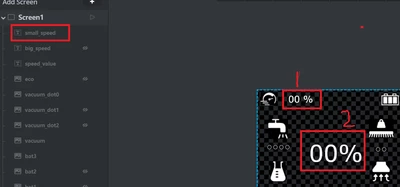
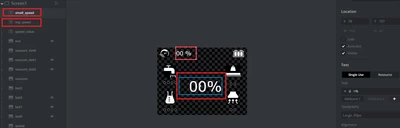
the function is fail and the top textArea is ok , but center textArea can't any change if pressed buttom, just list the initial value 0%
void Screen1View::speed_level(uint8_t speed,uint8_t big_spd) // speed icon+
{
 Unicode::snprintf(speed_valueBuffer,SPEED_VALUE_SIZE,"%d",speed); // display top textArea
 speed_value.invalidate();

 if(big_spd==1) // when press buttom
 {
 big_speed.setVisible(true); // visable textArea
 Unicode::snprintf(big_speedBuffer,BIG_SPEED_SIZE,"%d",speed); // display center textArea
 big_speed.invalidate();
 }
 else if(big_spd==0) // when release button
 {
 big_speed.setVisible(false); // invisable textArea
 big_speed.invalidate();
}
decrease function is ok for following code
void Screen1View::spd_level(uint8_t spd,uint8_t small_spd) // speed icon-
{
 Unicode::snprintf(speed_valueBuffer,SPEED_VALUE_SIZE,"%d",spd); // display top textArea
 speed_value.invalidate();
 if(small_spd==1) // when press buttom
 {
 small_speed.setVisible(true);
 Unicode::snprintf(small_speedBuffer,SMALL_SPEED_SIZE,"%d",spd); // display center textArea
 small_speed.invalidate();
 }
 else if(small_spd==0) // when release buttom
 {
 small_speed.setVisible(false);
 small_speed.invalidate();
 }
}
Edited to apply source code formatting - please see How to insert source code for future reference.