

netanelu
Associate III
June 15, 2025
Solved

cant program FUS and stack.

  • June 15, 2025
  • 1 reply
  • 395 views

Hi.

I'm working with the EVAL STM32WB5MM-DK for a while now, already programmed the stack and the FUS many times, and it's the first time I got this error.

After successfully open STM32CubeProgrammer (v2.19) and connected to the programmer, Selecting the latest FAS file (1.22.1)

And pressing "Firmware Upgrade", the upgrade fails and stop on warning "FAS_STATE_IMG_NOT_FOUND".

Same for my 2 laptops, 2 Evals, and 1 board connected to the ST-LINK programmer.

Happen also for stack programming, and after full chip erase.

Please advice.
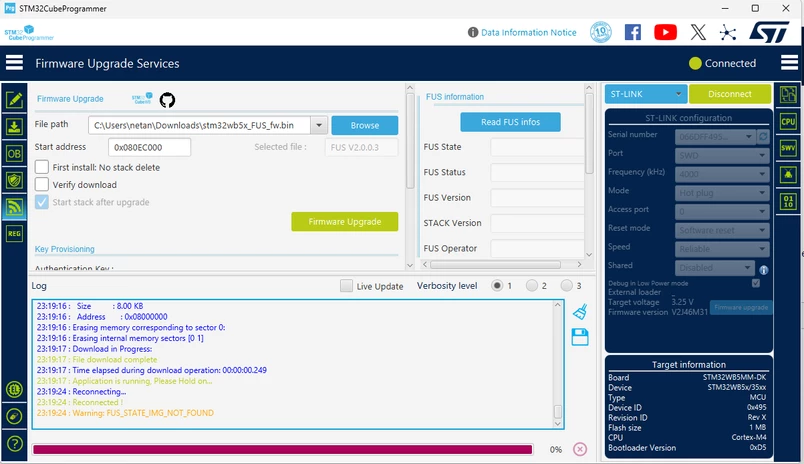
 

netanelu_0-1750019098157.png


Pressing Read FUS Info show information even after full chip erase.
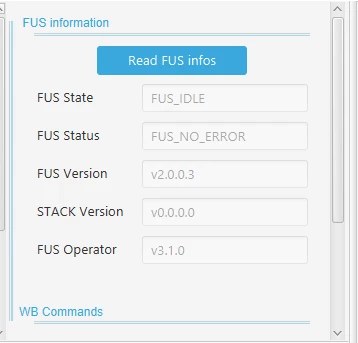
netanelu_1-1750019210318.png


Best answer by netanelu

Thank you,


To solve this issue FUS MUST RUN BEFORE PROGRAMMING THE STACK.

1. program FUS.

2. run FUS.

3. program the Stack

4. run Stack.

reboot and download the app.


1 reply

STTwo-32
Technical Moderator
June 16, 2025

Hello @netanelu 

For the stm32wb5x_FUS_fw.bin, the Start address is 0x080EE000. So, please use the correct start address.

Fo the Stack, since you are using the FUS V2.0.0, you should be aware that:

  • Warning 1: With FUS v2.0.0, Coprocessor Binaries can be installed only through the USB interface,
    Currently CubeProgrammer versions do not support “FW_delete” command when using the ST-Link interface. The next CubeProgrammer release will address this limitation.
  • Warning 2: For Coprocessor Binaries marked as “FUS_v2 only” in the Wireless Coprocessor Binary Table below, the “start address” provided by CubeProgrammer under “Firmware upgrade services” must be corrected as follows: start_address = (start_address - 0x4000). However addresses provided in the table are correct.

PS: don't forget to click on the First install: No stack delete since you don't have a stack already installed. And after Stack and FUS successfully installed, i recommend you click on "Start Wireless Stack" Buttons.

Best Regards.

STTwo-32

netanelu
netaneluAuthorBest answer
Associate III
June 22, 2025

Thank you,


To solve this issue FUS MUST RUN BEFORE PROGRAMMING THE STACK.

1. program FUS.

2. run FUS.

3. program the Stack

4. run Stack.

reboot and download the app.