Associate
May 21, 2025
Question

Debugging Error with ST Link /V2 With STM32WLE5JC custom board

  • May 21, 2025
  • 3 replies
  • 786 views

We are using stm32 mcu STM32WLE5JC custom board
below connection we are following for SWD Debugger

ISP1 Pin Connected To Function

1 3.3V VDD (VAPP)
2 PA13 SWDIO (Data I/O)
3 PA14 SWCLK (Clock)
4 NRST Reset (optional but recommended)
5 GND Ground

but while debugging we are getting below error please suggest solution.
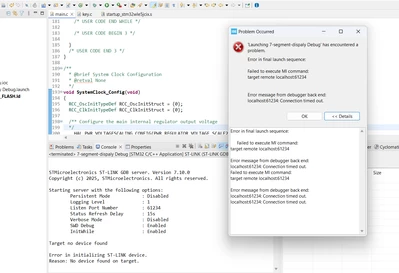
initiativewater_0-1747833590488.png


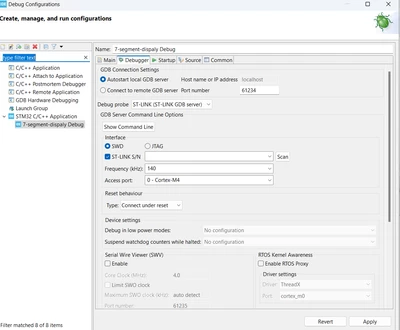
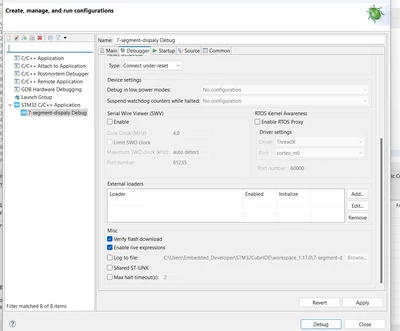
IDE Configuration:

initiativewater_1-1747833698034.pnginitiativewater_2-1747833723037.png


3 replies

STTwo-32
Technical Moderator
May 21, 2025

Hello @initiativewater and welcome to the ST Community. 

Could you please send a picture of your ST-LINK V2.

Best Regards.

STTwo-32


Associate
May 22, 2025

Hello STTwo-32,

Please see the attached, ST-LINK V2.

initiativewater_4-1747898750216.jpeginitiativewater_5-1747898760989.jpeginitiativewater_6-1747898771773.jpeg


Warm Regards

Komal


Peter BENSCH
Technical Moderator
May 22, 2025

This ST-LINK/V2 is very likely a counterfeit product, which can be seen from the completely old design of the box, which was changed long before 2024 (the date on the back). If the firmware cannot be updated using the light blue button ‘Firmware upgrade’, this ST-LINK/V2 cannot be used with the tools from STMicroelectronics.

Please see also: How to recognize a genuine ST-LINK/V2 versus a cloned one

Regards
/Peter

Peter BENSCH
Technical Moderator
May 21, 2025

Additionally: in the window with the debugger options, you ticked S/N, but the line does not show a S/N. Did you click Scan on the right?

Regards
/Peter

Associate
May 22, 2025

Hello Peter,

The earlier issue is solved after I selected the shared setting and scanned again, I get a multi character s/n.

The logs show voltage is also good at 3.07V but the core ID could not be read and target could not be found.

I just realised my boot0 pin has been left floating on my custom board. Could this be causing the issue ?

Rest of the data clock supply and ground pins are correctly connected as I verified using a multimeter.


initiativewater_0-1747897218175.png


initiativewater_1-1747897244879.png


initiativewater_2-1747897281110.png


initiativewater_3-1747897321276.png


Warm Regards
Komal

Peter BENSCH
Technical Moderator
May 22, 2025

@initiativewater 

the firmware V2J45S7 is an old one, please upgrade to the most recent one (currently V2J46S7).

And please insert photos of your ST-LINK/V2 (back and front) as requested by @STTwo-32.

Regards
/Peter

Associate
May 26, 2025

Hi Peter, @AScha.3,

I tied BOOT0 to GND and upgraded the ST-LINK/V2 to V2J46S7 (see screenshot).
However, CubeProgrammer still fails to read the target:

initiativewater_0-1748236433388.pnginitiativewater_1-1748236537040.pnginitiativewater_2-1748236599413.pnginitiativewater_3-1748236692027.png


Warm Regards,
Komal