Solved
Flashing M0+ Core with Zigbee RFD Firmware on STM32WB55
Dear ST Community,
I'm working on a Zigbee IoT project where I need to configure my STM32WB55RG Nucleo board as a Zigbee End Device that joins an external coordinator (Raspberry Pi + CC2531 running Zigbee2MQTT). I'm having trouble properly flashing the M0+ core with the Zigbee RFD firmware.
What I've Done So Far:
- Installed STM32CubeIDE 1.13.0 and STM32CubeProgrammer 2.13.0 on my Windows 11 laptop
- Located the Zigbee RFD firmware at:
STM32Cube_FW_WB_V1.16.0/Projects/STM32_Copro_Wireless_Binaries/Zigbee/stm32wb5x_Zigbee_RFD_fw.bin - Connected my Nucleo board via the ST-LINK USB port (CN4)
- Opened STM32CubeProgrammer and connected successfully to my board (STM32WB55RC)
My Specific Issue:
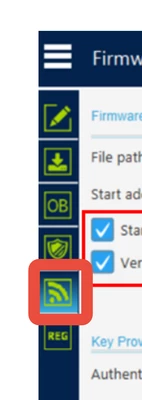
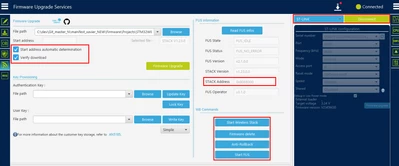
When I connect in STM32CubeProgrammer, I see the "MCU Core" section but I'm unsure how to correctly select the M0+ core (CPU2) for flashing. The interface shows:
- Cortex-M4 (CPU1)
- Cortex-M0+ (CPU2)
Questions:
- What is the exact procedure to select and flash the M0+ core (CPU2) in STM32CubeProgrammer?
- Are there specific settings I should verify before flashing (boot mode, jumpers, etc.)?
- How can I confirm after flashing that the M0+ core is running the Zigbee RFD firmware correctly?
- Is there a way to verify which firmware is currently running on each core?
I've reviewed ST's UM2237 documentation but couldn't find specific instructions for this Zigbee use case. I'm trying to set up my STM32WB55 as a clean end device that can join my existing Zigbee network (not act as a coordinator).
Thank you for your expertise and guidance!