
Associate II
May 7, 2025
Solved

How am I supposed to use CubeMX with STM32WPAN for BLE project ?

  • May 7, 2025
  • 1 reply
  • 730 views

Hi all,

I'm working on a BLE project on STM32WB5MMGHx module on each side (client and server).

For the server side, I use CubeMX to generate almost all the code (pairing configuration, GATT service and characteristics, etc.). I managed to "bypass" some CubeMX generated using the USER CODE comment areas to do what I wanted.

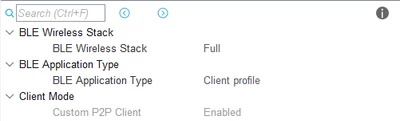
For the client part (more complex), I can only get a Custom P2P Client (this not what I want). Looks like I can't disable the Custom P2P Client (combobox disabled).

So here is the questions :

- How am I supposed to use CubeMX to create the BLE client with some custom code without bypassing 90% of CubeMX generated code (if possible...) ?

- Should I create all the projet manually and integrate some CubeMX generated code (in another folder) by hand ?
 

GuilhemG_0-1746603363938.png


Thx

Best answer by GuilhemG

Thank you @STTwo-32 the wiki page is pretty interesting, so long story short => do not use CubeMX unless you want a basic P2P client.

1 reply

STTwo-32
Technical Moderator
May 7, 2025

Hello @GuilhemG 

If you want to create a client code based on the STM32CubeMX, the Custom P2P Client is enabled by default and the code generated is the one based on this config. I don't know what you want to do but you may refer to the STM32WB55_BLE_HeartRate_Client together with this WIKI page. The example is based on the BLE_P2PClient application from STM32CubeWB V1.21.0. It configures a BLE Client for the BLE_HeartRate project from STM32CubeWB. You can try to use the same method for your implementation. 

Best Regards.

STTwo-32

GuilhemGAuthorBest answer
Associate II
May 7, 2025

Thank you @STTwo-32 the wiki page is pretty interesting, so long story short => do not use CubeMX unless you want a basic P2P client.

STTwo-32
Technical Moderator
May 7, 2025

Hello @GuilhemG 

No exactly but the STM32CubeMX will always generate the Custom P2P Client as client mode. This is very helpful for client configuration for startup. For the Peripherals (AES, RNG,...), you can enable and configure them on the generated .ioc file. After that, you can configure and implemented it.

Best Regards.

STTwo-32