

ledi001
Associate III
September 26, 2024
Solved

Problem with NUCLEO-WBA55CG Board - Failed to start GDB server

  • September 26, 2024
  • 1 reply
  • 1307 views

Hi,

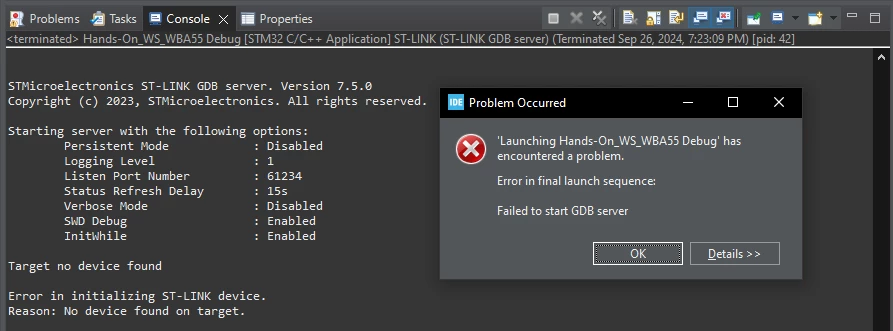
Today I received a new board from a distributor and used the Hands-On_WS_WBA55 example for initial tests. Everything worked fine. A few hours later, I reconnected the board to the USB board and wanted to flash the firmware. Since then I get the error message:

Error in final launch sequence:
Failed to start GDB server.
2024-09-26_19h35_22.png

I have tried the usual procedures (plugging and unplugging, restarting the PC, reinstalling the driver), but unfortunately without success. I also have a NUCLEO-WBA52CG EVAL board and there are no problems with flashing.

Please help!
Best answer by SefGen77

Figured out how to flash my device. May or may not be helpful to you.


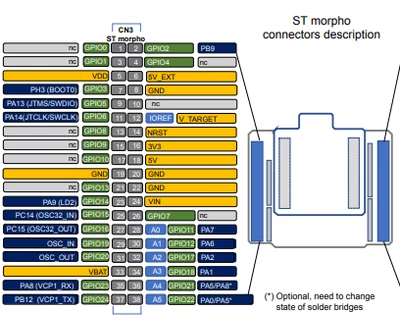
1. Jump IO Pins 5 & 7: This will pull up the BOOT0 Pin, allowing flash programming

SefGen77_2-1727850291908.png

2. Disconnect ST-Link. Unplug USB-C Cable

3. Reconnect ST-Link.

4. Program Device

5. Remove Jumper Between Pins 5 & 7

6. Disconnect and Reconnect ST-Link


These steps have allowed me to program my device, at the very least.


1 reply

ledi001
ledi001Author
Associate III
September 30, 2024

Today I tried another PC with Windows 11, but unfortunately I got the same results. But here in the details section is some more information, maybe that can help narrow down the problem.

2024-09-30_10h51_37.png

Explorer II
October 2, 2024

I am also having this issue with this board. In my case however, I am receiving a slightly different error message:

SefGen77_0-1727844026238.png

I have used a few Nucleo boards in the past and have never had this issue. I am thinking maybe debugging and flashing through st-link is disabled by default on this board or something of that nature. 

Should also state that USB-C cable has data transfer capabilities(confirmed).

Additionally, when trying to program using STM32CubeProgrammer, am seeing this:

SefGen77_1-1727846632260.png

Clearly its recognizing my board, yet still having issues. Any help would be appreciated!


SefGen77Best answer
Explorer II
October 2, 2024

Figured out how to flash my device. May or may not be helpful to you.


1. Jump IO Pins 5 & 7: This will pull up the BOOT0 Pin, allowing flash programming

SefGen77_2-1727850291908.png

2. Disconnect ST-Link. Unplug USB-C Cable

3. Reconnect ST-Link.

4. Program Device

5. Remove Jumper Between Pins 5 & 7

6. Disconnect and Reconnect ST-Link


These steps have allowed me to program my device, at the very least.