
Associate III
September 3, 2024
Question

STM32WB capricious fuss. How to erase chip to factory settings

  • September 3, 2024
  • 2 replies
  • 4064 views

Hello all) 

To work with BLE I need to upload 


stm32wb5x_BLE_Stack_full_fw.bin


with address 


0x080CE000


via STM32CubeProgrammer

It works as well, I did it many times, if check the box first boot for stack 

but I forgot (and not first time) to do that and now my BLE doesn't work on one of my devices

I made full chip erase, reuploaded stake, removed stack, and installed again dozen times via STM32CubeProgrammer, I did all can via  STM32CubeProgrammer (probably)

but it doesn't work anymore. 

Why STM32WB so capricious in this situation? 

Does it exist any opportunity to erase the chip to factory settings with the stack as well, let's say a more hard option than provided in  STM32CubeProgrammer ?
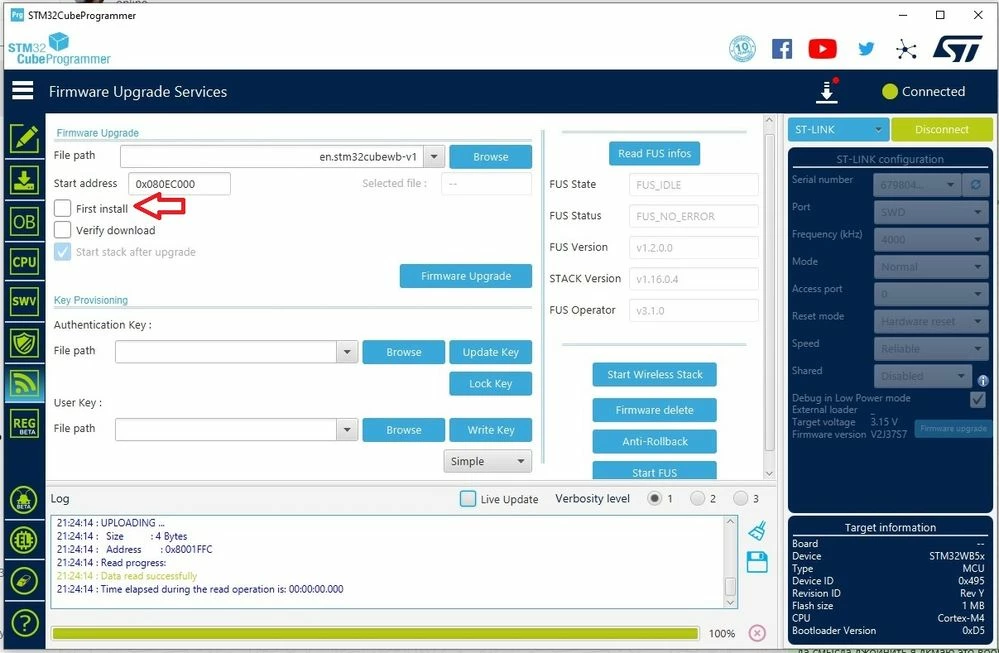
FUS.jpg

2 replies

STTwo-32
Technical Moderator
September 3, 2024

Hello @Ronil 

I'm not able to understand your issue. Is it the fact that you can use the BLE module of your MCU after FUS or Stack upgrade ?

Best Regards.

STTwo-32 

RonilAuthor
Associate III
September 3, 2024


To start using BLE I need to upload the stack in STM32WB

As you can see in my attached image from the first message I did it but forgot to make a mark - "First Install"
and now No matter what I do ( full chip erase, reuploaded stake, removed stack, and installed again), Bluetooth doesn't work


STTwo-32
Technical Moderator
September 3, 2024

I suggest you to update the FUS and Stack again but dont forget to click on "Start wireless stack" button after that and before disconnecting from CubeProgrammer.

Best Regards.

STTwo-32 

RonilAuthor
Associate III
September 17, 2024

Hi @STTwo-32  I added the settings for my BLE, Would it be helpful?


bin>STM32_Programmer_CLI -c port=SWD -ob displ
 -------------------------------------------------------------------
 STM32CubeProgrammer v2.17.0
 -------------------------------------------------------------------

ST-LINK SN : 6798040132124647524B4E00
ST-LINK FW : V2J37S7
Board : --
Voltage : 3.15V
SWD freq : 4000 KHz
Connect mode: Normal
Reset mode : Software reset
Device ID : 0x495
Revision ID : Rev Y
Device name : STM32WB5x/35xx
Flash size : 1 MBytes
Device type : MCU
Device CPU : Cortex-M4
BL Version : 0xD5
Debug in Low Power mode enabled


UPLOADING OPTION BYTES DATA ...

 Bank : 0x00
 Address : 0x58004020
 Size : 96 Bytes

██████████████████████████████████████████████████ 100%

 Bank : 0x01
 Address : 0x58004080
 Size : 8 Bytes

██████████████████████████████████████████████████ 100%


OPTION BYTES BANK: 0

 Read Out Protection:

 RDP : 0xAA (Level 0, no protection)

 BOR Level:

 BOR_LEV : 0x0 (BOR Level 0 reset level threshold is around 1.7 V)

 User Configuration:

 nBOOT0 : 0x1 (nBOOT0=1 Boot from main Flash)
 nBOOT1 : 0x1 (Boot from code area if BOOT0=0 otherwise system Flash)
 nSWBOOT0 : 0x0 (BOOT0 taken from the option bit nBOOT0)
 SRAM2RST : 0x1 (SRAM2 is not erased when a system reset occurs)
 SRAM2PE : 0x1 (SRAM2 parity check disable)
 nRST_STOP : 0x1 (No reset generated when entering the Stop mode)
 nRST_STDBY : 0x1 (No reset generated when entering the Standby mode)
 nRSTSHDW : 0x1 (No reset generated when entering the Shutdown mode)
 WWDGSW : 0x1 (Software window watchdog)
 IWDGSTDBY : 0x1 (Independent watchdog counter running in Standby mode)
 IWDGSTOP : 0x1 (Independent watchdog counter running in Stop mode)
 IWDGSW : 0x1 (Software independent watchdog)
 IPCCDBA : 0x0 (0x0)

 Security Configuration Option bytes - 1:

 ESE : 0x1 (Security enabled)

 PCROP Protection:

 PCROP1A_STRT : 0x1FF (0x80FF800)
 PCROP1A_END : 0x0 (0x8000800)
 PCROP_RDP : 0x0 (PCROP zone is kept when RDP is decreased)
 PCROP1B_STRT : 0x1FF (0x80FF800)
 PCROP1B_END : 0x0 (0x8000800)

 Write Protection:

 WRP1A_STRT : 0xFF (0x80FF000)
 WRP1A_END : 0x0 (0x8000000)
 WRP1B_STRT : 0xFF (0x80FF000)
 WRP1B_END : 0x0 (0x8000000)
OPTION BYTES BANK: 1

 Security Configuration Option bytes - 2:

 SFSA : 0xCE (0x80CE000)
 FSD : 0x0 (System and Flash secure)
 DDS : 0x1 (CPU2 debug access disabled)
 C2OPT : 0x1 (SBRV will address Flash)
 NBRSD : 0x0 (SRAM2b is secure)
 SNBRSA : 0xF (0x2003BC00)
 BRSD : 0x0 (SRAM2a is secure)
 SBRSA : 0xA (0x20032800)
 SBRV : 0x33800 (0x20000000)


Explorer II
August 7, 2025

Any updates on this? Facing the same issue here