
Associate II
November 19, 2024
Solved

STM32WBA52 programming on custom board

  • November 19, 2024
  • 6 replies
  • 1706 views

I am trying to detect my stm32wba52cg bare chip with my developed custom PCB board with onboard stlink as external programmer from a discoveryboard but its showing this msg-

Can not connect to target!
Please select "Connect Under Reset" mode from Target->Settings menu and try again.
If you're trying to connect to a low frequency application , please select a lower SWD Frequency mode from Target->Settings menu.
No target connected.

this are my connection for programming my wba52 controller-

discovery stlink                    stm32wba52

swdio                                          swdio

swclk                                           swclk

nrst                                               rst

3.3 (from discovery board)           3.3

gnd                                               gnd

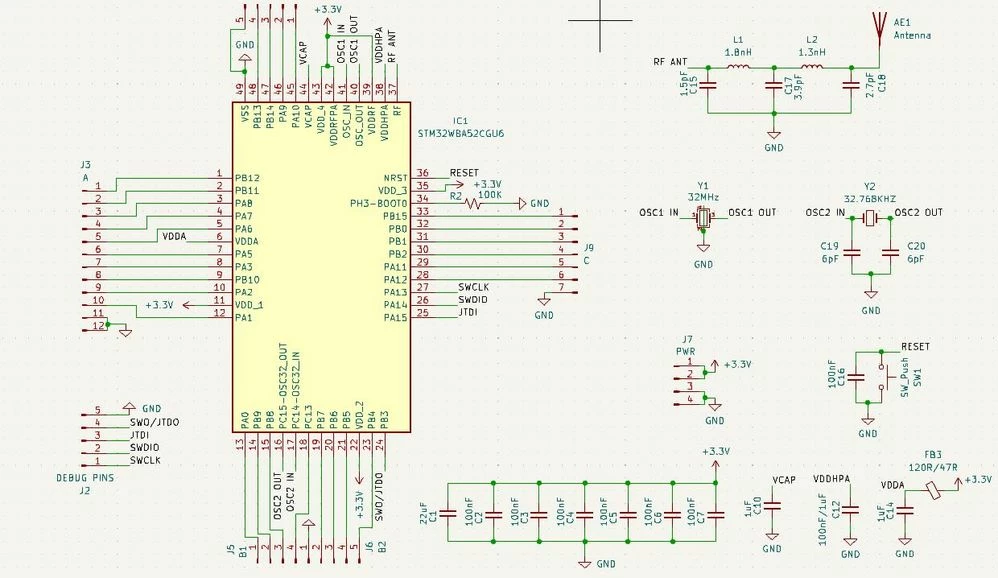
Below is my schematic attached:
I have exposed all the pins.
STM32WBA52CG.JPG


Best answer by STTwo-32

Hello @suvendusahux 

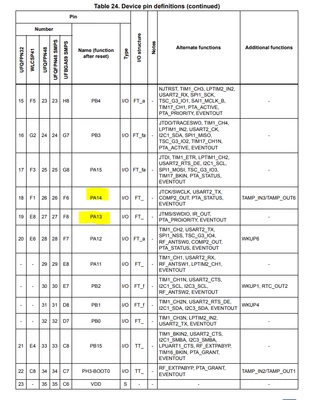
As I can see on your schematic, you are using the PA13 as SWCLK and PA14 as SWDIO. But as you can see on the Table 24 of the DS14127, PA14 is the SWCLK pin and PA13 is the SWDIO pin:

STTwo32_0-1732092735570.png

Best Regards.

STTwo-32

6 replies

Andrew Neil
Super User
November 19, 2024

@suvendusahux wrote:

 stm32wba52cg bare chip   


What do you mean by that - Literally a bare chip; no PCB at all?  A custom PCB ? Other?


A complex system that works is invariably found to have evolved from a simple system that worked.A complex system designed from scratch never works and cannot be patched up to make it work.
Associate II
November 19, 2024

A custom pcb with stmwba52. 

Andrew Neil
Super User
November 19, 2024

Thanks - I updated the title to reflect that.

Please post the schematic of your board.

Some good, clear photos of your setup would also help.

https://community.st.com/t5/community-guidelines/how-to-write-your-question-to-maximize-your-chances-to-find-a/ta-p/575228

A complex system that works is invariably found to have evolved from a simple system that worked.A complex system designed from scratch never works and cannot be patched up to make it work.
Associate II
November 20, 2024

I have attached the schematic above. Please check.

STTwo-32
STTwo-32Best answer
Technical Moderator
November 20, 2024

Hello @suvendusahux 

As I can see on your schematic, you are using the PA13 as SWCLK and PA14 as SWDIO. But as you can see on the Table 24 of the DS14127, PA14 is the SWCLK pin and PA13 is the SWDIO pin:

STTwo32_0-1732092735570.png

Best Regards.

STTwo-32

Associate II
December 2, 2024

I am trying to load the BLE_heartrate_ota example to my wba52 controller I am getting these logs after RUN and DEBUG -


STMicroelectronics ST-LINK GDB server. Version 7.5.0

Copyright (c) 2023, STMicroelectronics. All rights reserved.


Starting server with the following options:

Persistent Mode : Disabled

Logging Level : 1

Listen Port Number : 61234

Status Refresh Delay : 15s

Verbose Mode : Disabled

SWD Debug : Enabled

InitWhile : Enabled


Waiting for debugger connection...

Debugger connected

Waiting for debugger connection...

Debugger connected

Waiting for debugger connection...

-------------------------------------------------------------------

STM32CubeProgrammer v2.15.0

-------------------------------------------------------------------

ST-LINK SN : 066DFF555185754867142533

ST-LINK FW : V2J45M30

Board : NUCLEO-F446RE

Voltage : 3.26V

SWD freq : 4000 KHz

Connect mode: Under Reset

Reset mode : Hardware reset

Device ID : 0x492

Revision ID : Rev A

Device name : STM32WBA52/54/55

Flash size : 1 MBytes

Device type : MCU

Device CPU : Cortex-M33

BL Version : 0xB0


Memory Programming ...

Opening and parsing file: ST-LINK_GDB_server_a15024.srec

File : ST-LINK_GDB_server_a15024.srec

Size : 223.95 KB

Address : 0x08000000


Erasing memory corresponding to segment 0:

Erasing internal memory sectors [0 27]

Download in Progress:


File download complete

Time elapsed during download operation: 00:00:02.366


Verifying ...


Download verified successfully


Target is not responding, retrying...

Target is not responding, retrying...

Target is not responding, retrying...

Target is not responding, retrying...

Shutting down...

Target is not responding, retrying...

Target is not responding, retrying...

Target is not responding, retrying...

Target is not responding, retrying...

Target is not responding, retrying...

Target is not responding, retrying...

Target is not responding, retrying...

Target is not responding, retrying...

Target is not responding, retrying...

Associate II
December 2, 2024

PA14 is the SWCLK pin and PA13 is the SWDIO pin i swaped the pins and it detected the mcu but I am getting Target is not responding message every time I try to run or debug the BLE_heartrate_ota example for stm32wba52.


Associate II
December 3, 2024

I Tried to connect buttons to my mcu as shown in nucleo board but its not showing in my st ble toolbox when I press B1 connected to PC13.

Associate II
December 3, 2024

These are some logs from usart1 when I press reset button.

==>> Start Ble_Hci_Gap_Gatt_Init function
Success: aci_hal_write_config_data command - CONFIG_DATA_PUBADDR_OFFSET
Public Bluetooth Address: 00:80:e1:2a:b0:9a
Success: aci_hal_write_config_data command - CONFIG_DATA_IR_OFFSET
Success: aci_hal_write_config_data command - CONFIG_DATA_ER_OFFSET
Success: aci_hal_set_tx_power_level command
Success: aci_gatt_init command
Success: aci_gap_init command
Success: aci_gatt_update_char_value - Device Name
Success: aci_gatt_update_char_value - Appearance
Success: hci_le_set_default_phy command
Success: aci_gap_set_io_capability command
Success: aci_gap_set_authentication_requirement command
Success: aci_gap_configure_whitelist command
==>> End Ble_Hci_Gap_Gatt_Init function

Services and Characteristics creation
Success: aci_gatt_add_service command: P2P_Server
Success: aci_gatt_add_char command : LED_C
Success: aci_gatt_add_char command : SWITCH_C
Success: aci_gatt_add_service command: OTA
Success: aci_gatt_add_char command : BASE_ADR
Success: aci_gatt_add_char command : CONF
Success: aci_gatt_add_char command : RAW_DATA
End of Services and Characteristics creation

STTwo-32
Technical Moderator
December 3, 2024

Hello @suvendusahux 

This is a new issue. please close this post by selecting the answer to your original post as best answer. After that create a new post with a good description of the behavior. This will give your post more visible for others who have the same issue and may have a quick solution.

Best Regards.

STTwo-32