Associate
January 30, 2026
Solved

STM32WBA65 UFQFPN48 Footprint Issue: OSC32_IN/OUT Pin Mapping Discrepancy

  • January 30, 2026
  • 1 reply
  • 209 views

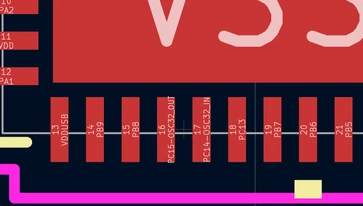
Hi all, Im currently designing my own pcb with a STM32WBA65CIU6 MCU in the UFQFPN48 package.
Im doing this for the first time (still gaining all the knowledg needed) and currently ran into the following problem:
I'm having trouble understanding the footprint and EDA symbol given for the STM32WBA65CIU6 on the product site and shop. 

According to those, eg OSC32 are Pins 16 and 17:
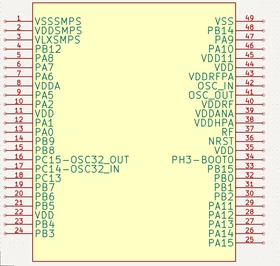
Banjo_2-1769810413305.png

Banjo_0-1769810866553.png


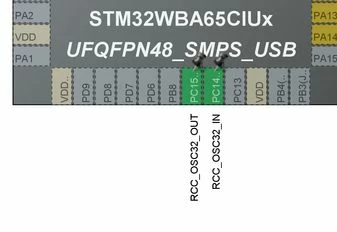
But according to the data sheet and also in CubeMX the OSC32 should be pin 19 & 20:
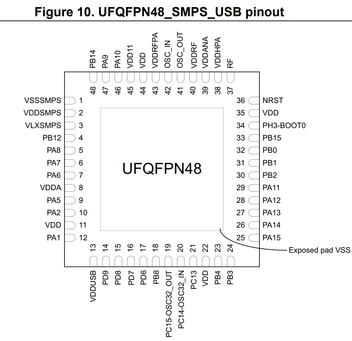
Banjo_3-1769810568978.png


Banjo_2-1769811429896.jpeg


Is this not a problem and can be solderd anyway? Also some other pin names are also missmatched :\
Thanks for the help :)

Best answer by TDK

That is my guess as well. I always make my own symbols.

yes, the footprint is identical, just different pin names.

1 reply

TDK
Super User
January 30, 2026

The datasheet and CubeMX are correct. The symbol seems to be for the SMPS non-USB package where the pin out is different.

Are you sure there isn’t another EDA symbol provided somewhere?

TDK_0-1769816076907.jpeg


"If you feel a post has answered your question, please click ""Accept as Solution""."
BanjoAuthor
Associate
January 31, 2026

I dont seem to find any other options to select on the product page/store page. A google search also didnt get me further. Im guessing that the provided symbol is just a basic version and I have to ajust the pinout myself?
The footprint should still be the same size right, only depending on the package?

Banjo_0-1769850300629.png
Source: Product Page for STM32WBA65CI (same on the product page for the specific version WBA65CIU6)


TDK
TDKBest answer
Super User
January 31, 2026

That is my guess as well. I always make my own symbols.

yes, the footprint is identical, just different pin names.

"If you feel a post has answered your question, please click ""Accept as Solution""."