Karthi
Associate II
October 26, 2024
Solved

STM32WL LPTIM2 and LPTIM3 Not working

  • October 26, 2024
  • 2 replies
  • 1094 views

Hi

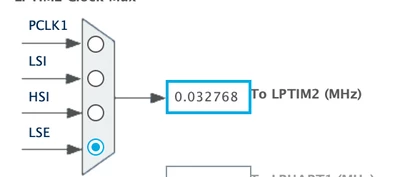
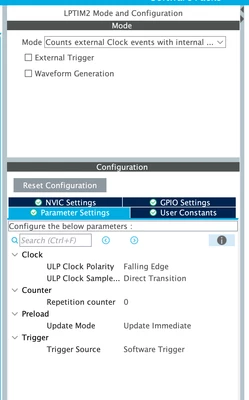
When LPTIM2 and LPTIM3 enabled with "Count Extenal Clock with internal sync" with LPTIM2 Global interupt Enabled, it is not calling void HAL_LPTIM_AutoReloadMatchCallback(LPTIM_HandleTypeDef *hlptim)

But LPTIM1 is working perfectly as expected , it is calling  HAL_LPTIM_AutoReloadMatchCallback(LPTIM_HandleTypeDef *hlptim)
 

Karthi_0-1729928311003.png

Karthi_1-1729928328754.png


 /* USER CODE END LPTIM2_Init 1 */
 hlptim2.Instance = LPTIM2;
 hlptim2.Init.Clock.Source = LPTIM_CLOCKSOURCE_APBCLOCK_LPOSC;
 hlptim2.Init.Clock.Prescaler = LPTIM_PRESCALER_DIV1;
 hlptim2.Init.UltraLowPowerClock.Polarity = LPTIM_CLOCKPOLARITY_FALLING;
 hlptim2.Init.UltraLowPowerClock.SampleTime = LPTIM_CLOCKSAMPLETIME_DIRECTTRANSITION;
 hlptim2.Init.Trigger.Source = LPTIM_TRIGSOURCE_SOFTWARE;
 hlptim2.Init.OutputPolarity = LPTIM_OUTPUTPOLARITY_HIGH;
 hlptim2.Init.UpdateMode = LPTIM_UPDATE_IMMEDIATE;
 hlptim2.Init.CounterSource = LPTIM_COUNTERSOURCE_EXTERNAL;
 hlptim2.Init.Input1Source = LPTIM_INPUT1SOURCE_GPIO;
 hlptim2.Init.Input2Source = LPTIM_INPUT2SOURCE_GPIO;
 if (HAL_LPTIM_Init(&hlptim2) != HAL_OK)
 {
 Error_Handler();
 }
 /* USER CODE BEGIN LPTIM2_Init 2 */
 HAL_LPTIM_Counter_Start_IT(&hlptim2,PULSE_WAUP_COUNT);


Exmaple used was LoRaWAN_End_Node, STteam Please check and update

Thanks

Best answer by STTwo-32

Hello @Karthi 

In fact, the LPTIM1 can be configured to wakeup the MCU from STOP2 mode but the LPTIM2 & 3 can't wakeup the MCU from STOP2 mode. On the LoRaWAN_End_Node example, the #define LOW_POWER_DISABLE is set to 0 as a default value, that means the MCU can enter STOP2 mode. So, the LPM (Low Power Manager) will put the MCU to STOP2 mode on the sequencer IDLE task. If you want to use the LPTIM2 & 3, you have to set the #define LOW_POWER_DISABLE to 1 so on the IDLE task, the MCU is putted to SLEEP mode.

Best Regards.

STTwo-32 

2 replies

STTwo-32
STTwo-32Best answer
Technical Moderator
October 30, 2024

Hello @Karthi 

In fact, the LPTIM1 can be configured to wakeup the MCU from STOP2 mode but the LPTIM2 & 3 can't wakeup the MCU from STOP2 mode. On the LoRaWAN_End_Node example, the #define LOW_POWER_DISABLE is set to 0 as a default value, that means the MCU can enter STOP2 mode. So, the LPM (Low Power Manager) will put the MCU to STOP2 mode on the sequencer IDLE task. If you want to use the LPTIM2 & 3, you have to set the #define LOW_POWER_DISABLE to 1 so on the IDLE task, the MCU is putted to SLEEP mode.

Best Regards.

STTwo-32 

Karthi
KarthiAuthor
Associate II
November 2, 2024

Let us try, Will provide you feedback @STTwo-32 

Karthi
KarthiAuthor
Associate II
November 14, 2024

Hi @STTwo-32 

LPTIM2 & 3, is working with #define LOW_POWER_DISABLE to 1

Thanks