Associate II
November 26, 2025
Solved

Unable to build example project on NUCLEO-STM32WBA55

  • November 26, 2025
  • 1 reply
  • 123 views

I'm working with a NUCLEO-STM32WBA55 board and trying to build the BLE_p2pClient example project, but it fails with the error shown below:

I../../System/Modules -O0 -ffunction-sections -fdata-sections -Wall -fstack-usage -fcyclomatic-complexity -MMD -MP -MF"Drivers/STM32WBAxx_HAL_Driver/stm32wbaxx_hal_gpio.d" -MT"Drivers/STM32WBAxx_HAL_Driver/stm32wbaxx_hal_gpio.o" --specs=nano.specs -mfpu=fpv5-sp-d16 -mfloat-abi=hard -mthumb -o "Drivers/STM32WBAxx_HAL_Driver/stm32wbaxx_hal_gpio.o"
make: *** No rule to make target 'D:/STM32Cube/BLE_p2pClient/Drivers/STM32WBAxx_HAL_Driver/Src/stm32wbaxx_hal_gtzc.c', needed by 'Drivers/STM32WBAxx_HAL_Driver/stm32wbaxx_hal_gtzc.o'. Stop.
make: *** Waiting for unfinished jobs....
"make -j8 all" terminated with exit code 2. Build might be incomplete.

10:35:54 Build Failed. 2 errors, 0 warnings. (took 6s.752ms)


Environment:

CubeIDE 2.0.0, CubeMX 6.16.0, WBA FW 1.8.0, X-CUBE-MEMS1 12.0.0
Best answer by KDJEM.1

Hello @kclauah ;


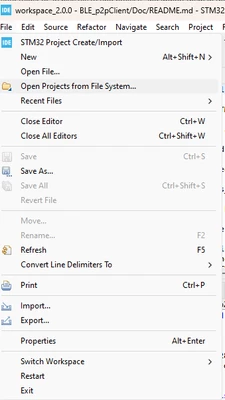
Could you please try to click at "Open Projects from File System" to open the example

KDJEM1_1-1764666714096.png

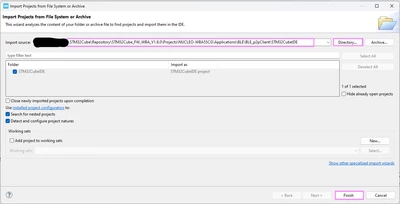
Then, choose the "Directory"

KDJEM1_0-1764666666857.png


If you want to generate code from .ioc file using STM32CubeMX toolchain, I recommend you to copy the .ioc file in a new workspace then generate code and open the project using STM32CubeIDE


I hope this help you.

Thank you.

Kaouthar


1 reply

KDJEM.1
KDJEM.1Best answer
Technical Moderator
December 2, 2025

Hello @kclauah ;


Could you please try to click at "Open Projects from File System" to open the example

KDJEM1_1-1764666714096.png

Then, choose the "Directory"

KDJEM1_0-1764666666857.png


If you want to generate code from .ioc file using STM32CubeMX toolchain, I recommend you to copy the .ioc file in a new workspace then generate code and open the project using STM32CubeIDE


I hope this help you.

Thank you.

Kaouthar


To give better visibility on the answered topics, please click on Accept as Solution on the reply which solved your issue or answered your question.