Associate II
December 15, 2025
Question

After updating to 3.7.0, my system no longer works.

  • December 15, 2025
  • 3 replies
  • 741 views

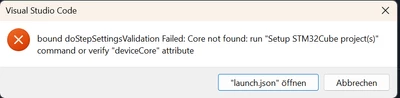
Hello, after updating to 3.7.0, my system no longer works. I can't debug and now get an error message. It was still working an hour ago.

PaulB_1_0-1765813122775.pngPaulB_1_1-1765813136291.png


3 replies

PaulB_1Author
Associate II
December 15, 2025

ok What helped me was
“deviceCore”: “Cortex-M7,”
unfortunately there are no suggestions, so you don't know what form it needs to be in.

PaulB_1Author
Associate II
December 15, 2025

Unfortunately, it still doesn't work smoothly with two NUCLEO BOARDS H7S3L8. I always have to start board 2 first, then board 1, otherwise I keep getting this error message. However, if I start board 2 first, then board 1, it works.

Reading symbols from d:/Projekte/Test/Cube/Board2/Test/Boot/build/test.elf...
Exit.
cube has exited with code 0Ignoring packet error, continuing...
warning: unrecognized item "timeout" in "qSupported" response

PaulB_1_0-1765814353763.png


Florent V
ST Employee
December 15, 2025

Hi Paul,


Your first error indicates that the device core cannot be found automatically.
The project setup was likely incomplete. Therefore, please execute the command "STM32Cube: Setup STM32Cube project(s)" via the command palette or thanks to the menu in the STM32Cube activity bar (recommended solution):

FlorentV_3-1765816076910.png

Alternatively, you can add the "deviceCore" attribute with the value Cortex-M7 in your case.


Concerning the multiple boards connected, you need to specify the serial number using the attribute

"serverSerialNumber": "<the serial number>",


the serial number can be copied in the "STM32Cube Devices and Boards" view here:
FlorentV_2-1765816013615.png

Without the serial number attribute, the debug session cannot determine which board is the correct one.

KR,
Flo


To give better visibility on the answered topics, please click on Accept as Solution on the reply which solved your issue or answered your question.
Visitor II
December 17, 2025

Hi there

While developing today my system suddenly stopped being able to start the debugger. I suspect this is due to VSCode updating the extension to 3.7.0. I get the same error as Paul above:

bound doStepConnectToTarget Failed: Remote replied unexpectedly to 'vMustReplyEmpty': timeout

EPoulsen_0-1765976757671.png

The debug console shows:

Reading symbols from PATH TO elf...

Ignoring packet error, continuing...
warning: unrecognized item "timeout" in "qSupported" response
Ignoring packet error, continuing...
 
I only have a single STLink connected, and have tested two individual board (one custom, one STM32F411E-DISCO).
 
 
Any clues to what could fix this issue?
 
Thanks!
 
Best,
Ebbe
Visitor II
December 18, 2025

Hello again

I got my debugger working by:

  • Uninstalling all ST programs from my machine
  • Uninstalling VSCode extension
  • Reinstalling VSCode extension
  • Updating ST-Link firmware


Mikk Leini
Senior
March 5, 2026

I got this error also unexpectedly. Didn't change anything in setup, just launched it like yesterday. Target was connectable with STM32CubeProgrammer, but not with vscode debug session. These "fixes" didn't help:

  • stlink re-plugging
  • target re-powering
  • vscode restart
  • cmake clean rebuild
  • STM32Cube project re-setup.

But computer (Windows) restart helped.


Another things is it that it seems to me that the popping up error dialogs are vscode, it's extensions, OS or some other software messages that are given based on the error codes that the ST/GDB extensions/tools give and they are not matching up. I have seen the nonsense "network drive join error" or something like that when I have target connection problem. Needless to say, it is not very helpful.

Julien D
ST Employee
March 5, 2026

@Mikk Leini wrote:

But computer (Windows) restart helped.


One hypothesis could be that the running background service (cube-cmsis-scanner.exe - active for 20min after the last connection) was not in sync with the software in VSCode anymore. To be confirmed internally but this could explain.

To give better visibility on the answered topics, please click on Accept as Solution on the reply which solved your issue or answered your question.
