
ZHan.2
Associate
March 21, 2023
Solved

How to flash and debug program use this extension? I can only build it so far. Btw, are there any tutorials with all the details of how to use this extension? I only found some demo videos and release notes where most details are missing.

  • March 21, 2023
  • 1 reply
  • 2337 views

..

This topic has been closed for replies.
Best answer by Nawres GHARBI

Hi @ZHan.2​ 

to flash and debug go the the run and debug tab
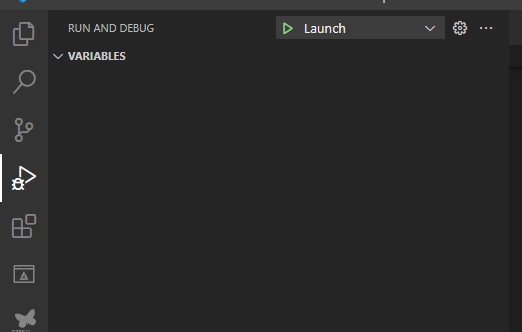
0693W00000aJkvoQAC.pngor directly click on debug icon at the top down of the window (blue bar)

0693W00000aJkwNQAS.png

1 reply

Nawres GHARBI
Nawres GHARBIBest answer
Technical Moderator
March 27, 2023

Hi @ZHan.2​ 

to flash and debug go the the run and debug tab

0693W00000aJkvoQAC.pngor directly click on debug icon at the top down of the window (blue bar)

0693W00000aJkwNQAS.png

ZHan.2
ZHan.2Author
Associate
March 30, 2023

Hi Nawres, thanks for your reply. Now, I can debug the program using the run and debug tab and click the launch button. But the debug icon at the bottom doesn't do the job. The vs code always prompts "No compiler found in the cache file" when I click it.

Another question is that can I run the program without debugging? When I click the run button at the bottom, it seems to run the elf file directly on my desktop.
