Associate
September 30, 2025
Solved

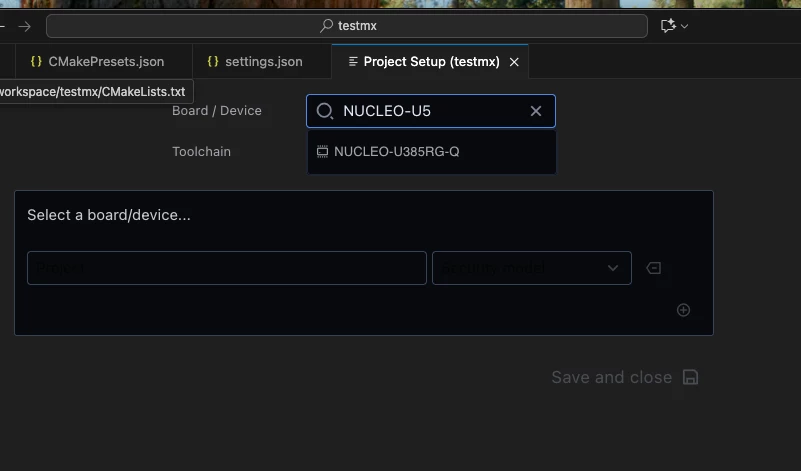
NUCLEO-U5A5ZJ-Q Not showing in Board/Device

  • September 30, 2025
  • 1 reply
  • 261 views

When I setup my STM32CubeProject the NUCLEO-U5A5ZJ-Q  does not show up as option. No U5 devices show up. Is there a pack or something else I need to install?

Thanks

stm32.png

Best answer by macfai2

Thanks @vincent_grenet . The sync failed due to certificate issues. Zscaler is being used so I set NODE_EXTRA_CA_CERTS appropriately and now everything seems to be working. Thanks

1 reply

ST Employee
September 30, 2025

@macfai2,

I confirm that this board is supported.

vincent_grenet_0-1759210629027.png
Could you please try using the VSCode integrated terminal to execute the following command? Then, please try creating a new project again. (Assuming you are using STM32CubeIDE for the Visual Studio Code pre-release extension pack setup.)

cube pack sync


To give better visibility on the answered topics, please click on Accept as Solution on the reply which solved your issue or answered your question.
macfai2AuthorBest answer
Associate
September 30, 2025

Thanks @vincent_grenet . The sync failed due to certificate issues. Zscaler is being used so I set NODE_EXTRA_CA_CERTS appropriately and now everything seems to be working. Thanks