
Associate
February 19, 2026
Solved

STM32CubeIDE Extension Stuck in "Infinite Loading" and Fails to Recognize CMake Projects

  • February 19, 2026
  • 4 replies
  • 689 views

When opening a project directory in VS Code, the STM32CubeIDE for Visual Studio Code extension gets stuck in an infinite loading state (as shown in the screenshot below).
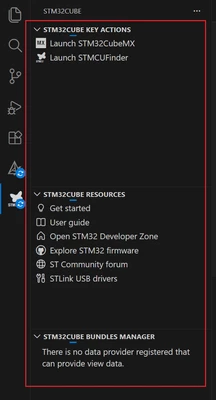
LiHua_0-1771511437856.png

Symptoms:

  • "Go to Definition" does not work.

  • The Build Analyzer view does not appear.

  •  clicking the "Build" button still triggers a successful compilation.

  • Most dependent extensions, such as STM32Cube CMake Support, remain inactive
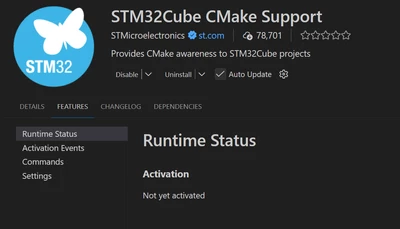
LiHua_1-1771511614227.png

Here is the log output from STM32Cube Core during the failed loading:
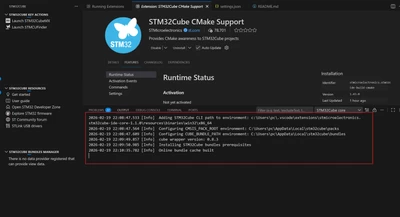
LiHua_3-1771511803828.png

I discovered that if I completely disconnect my PC from the internet before launching VS Code, the extension reports a network error but then successfully initializes after a short period. Once initialized offline, all features (including Go to Definition) work perfectly.

Here are the logs from a successful (offline) launch:
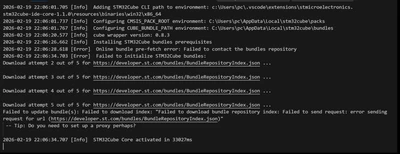
LiHua_2-1771511706245.png

My computer’s network connection is working fine. I tested this URL in the VS Code command line —developer.st.com/bundles/BundleRepositoryIndex.json — and it downloads normally. I’ve tried both the latest version (3.7.0) and the older version (3.6.4), but neither fixed the issue. Right now, the only way I can open it is by disconnecting my computer from the network. Is there any way to solve this problem?


Best answer by Julien D

Do you see any interesting information, such as errors, in the Developer Tools console during the startup period?
(See Help > Toggle Developer Tools > Console tab)

Feel free to send it to me via private message if you consider the content should not be posted here.

4 replies

Cartu38 OpenDev
Graduate II
February 19, 2026

@LiHua 

Any "chance" you are experiencing an extension conflict ?

Have you extra extension as addition to STM32Cube ones ?

Cartu38 OpenDev
Graduate II
February 19, 2026

@LiHua 

If first time install have you seen bottom right notification asking you to accept STM32Cube bundles install as extra of extensions ?

LiHuaAuthor
Associate
February 20, 2026

I deleted the VSCode data folder and reinstalled VSCode from scratch.

Now I only have the STM32Cube extension installed, along with the dependencies that were automatically installed by it. There are no additional extensions.

However, I am still experiencing the same issue.

Cartu38 OpenDev
Graduate II
February 20, 2026

@LiHua 

Ok.

What about bundles ? Are you getting them ?

Could you share which OS and which VS Code version please as extra.

Cartu38 OpenDev
Graduate II
February 20, 2026

@LiHua 
Maybe have a try about an incremental setup to identify what is blocking on your side.

+ As first step, from clean env., have just a try to install not the extension pack but the very first extension of which is https://marketplace.visualstudio.com/items?itemName=stmicroelectronics.stm32cube-ide-core.
It should manage bundles install too.

+ Once ok have a try about https://marketplace.visualstudio.com/items?itemName=ms-vscode.cmake-tools

+ Once ok have a try about https://marketplace.visualstudio.com/items?itemName=stmicroelectronics.stm32cube-ide-build-cmake

+ Once ok have a try about https://marketplace.visualstudio.com/items?itemName=stmicroelectronics.stm32cube-ide-bundles-manager. Are you able to get bundle manager GUI up & running ?

"Once ok" means extension activated
active.png

LiHuaAuthor
Associate
February 20, 2026

Thank you very much for your suggestion.I also updated my VSCode version to 1.109.5, but the issue still remains.

After cleaning my environment, I followed your steps and installed the extensions one by one. However, at step 3, STM32Cube CMake Support got stuck while activating.

I tried restarting VSCode, but STM32Cube CMake Support always stays in the “Activating” state and never finishes.

Below are its logs.

log_1.png

Could this be caused by a network issue on my side?

Julien D
ST Employee
February 20, 2026

Hi @LiHua,

Does "STM32Cube CMake Support" never activate even if you don't have any folder/workspace opened in VSCode ?

To give better visibility on the answered topics, please click on Accept as Solution on the reply which solved your issue or answered your question.
Julien D
Julien DBest answer
ST Employee
February 20, 2026

Do you see any interesting information, such as errors, in the Developer Tools console during the startup period?
(See Help > Toggle Developer Tools > Console tab)

Feel free to send it to me via private message if you consider the content should not be posted here.

To give better visibility on the answered topics, please click on Accept as Solution on the reply which solved your issue or answered your question.
LiHuaAuthor
Associate
February 20, 2026

Thank you for your suggestion.

In VSCode Developer Tools, I found the following two warnings:

data-collector/detect-st-user-service: DNS lookup failed for [obfuscated-url]: Error: getaddrinfo ENOTFOUND [obfuscated-url]
at GetAddrInfoReqWrap.onlookup [as oncomplete] (node:dns:111:26)

and

data-collector/detect-st-user-service: DNS reverse lookup failed: getHostByAddr ENOTFOUND 192.168.1.8

So I changed my computer’s DNS setting from manual IPv4 (8.8.8.8) to DHCP, and now all the extensions can open and run normally.

Since my STM32CubeMX software had always been able to access the internet and update normally, I hadn’t considered this DNS issue before.