
Associate II
September 27, 2024
Solved

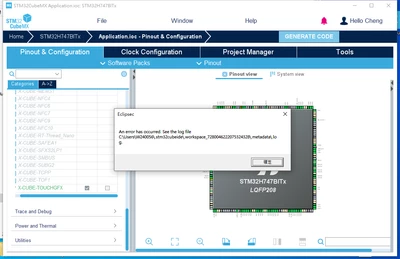
An error has occurred.See the log file. Error after added TouchGFX in CubeMX.

  • September 27, 2024
  • 3 replies
  • 1510 views

I am using STM32H747BITx MCU and i've try CubeMX6.12.0 ,CubeMX6.10.0.Still the same problem. 
ChungEN_0-1727401804466.png

If I do not enable TouchGFX in CubeMX, I can successfully generate the code. However, if I enable TouchGFX, an error message like the one shown in the picture appears, and it cannot be compiled correctly in CubeIDE.

Best answer by KDJEM.1

Hello @ChungEN,


I tested with STM32CubeMX 6.13.0 version and I am not able to reproduce the issue.

You can find in the attachment "ioc" file.


Thank you.

Kaouthar

3 replies

ChungENAuthor
Associate II
September 27, 2024

It seems that CubeIDE does not support generating TouchGFX projects for the dual-core H747. The only examples I found that can be used are for the STM32H747I-DISCO development board, but that's not feasible for me. The MCU I am using is the STM32H747BIT6, not the STM32H747I-DISCO's STM32H747XIH6.

KDJEM.1
Technical Moderator
October 9, 2024

Hello @ChungEN ,


Are you test this behavior with the latest STM32CubeMx version 6.12.1?

To check the issue could you please share your .ioc and log files?


Thank you.

Kaouthar 

To give better visibility on the answered topics, please click on Accept as Solution on the reply which solved your issue or answered your question.
KDJEM.1
KDJEM.1Best answer
Technical Moderator
December 2, 2024

Hello @ChungEN,


I tested with STM32CubeMX 6.13.0 version and I am not able to reproduce the issue.

You can find in the attachment "ioc" file.


Thank you.

Kaouthar

To give better visibility on the answered topics, please click on Accept as Solution on the reply which solved your issue or answered your question.