yilmazkircicek
Associate III
April 13, 2025
Solved

Cannot open ico file from link provided by ST

  • April 13, 2025
  • 2 replies
  • 924 views

@TDK wrote:

They're not made using STM32CubeMX.


There should be an internal reason of this decision but it does not seem reasonable for a customer viewpoint. An expert ST staff could easily done this for all of us. Anyway, at least we have an example.

Thanks for your time...

New question moved from this original thread.
Best answer by mƎALLEm

Hello @yilmazkircicek ,

I've normally opened H74_Discovery_STM32H745I-DISCO_STM32H745XIH_Board_AllConfig.ioc as shown in this screenshot:

mALLEm_0-1744631430759.png

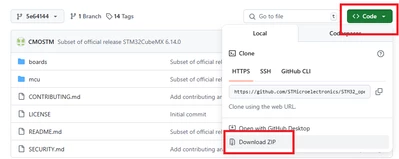
How did you download that file? please download the all package from github:

mALLEm_1-1744631559363.png

Unzip the package and open the ioc file with the latest version of CubeMx (the latest version is 6.14)


2 replies

Pavel A.
Super User
April 13, 2025

Some new MCU families do include .ioc files.  The internal reason is that many STM32 product families and their examples have were released long ago, before the CubeMX stabilized. Also, updates and development of CubeMX would require resources for regression testing of these examples. The "expert staff" has probably other important things to do ))

The .ioc files for many ST boards are available here. Though these .ioc's are not coupled with specific functional example code. Al least, this is something to start from.


yilmazkircicek
Associate III
April 14, 2025

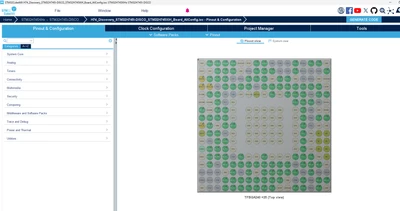
Thanks for the link, I have tried "H74_Discovery_STM32H745I-DISCO_STM32H745XIH_Board_AllConfig.ioc" and here is the result; a perfect forward and backward compatibility :) 

yilmazkircicek_0-1744620553719.png


Pavel A.
Super User
April 14, 2025

What is your CubeMX version? I have 6.11.1 here, it opens this ioc file without issues.


.

Pavel A.
Super User
April 14, 2025

@KDJEM.1 @mƎALLEm   ? Why CubeMX 6.14 fails to open .ioc files from github that open successfully with v. 6.11.1 ?@