Associate
July 15, 2025
Solved

CMake Project Generated by STM32CubeMX 6.15: build fails; says "Compiler Broken"

  • July 15, 2025
  • 3 replies
  • 2242 views

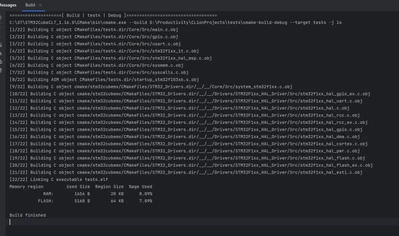
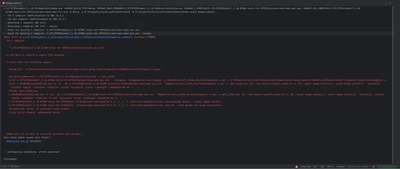
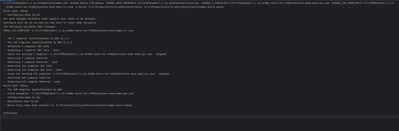
Recently I'm trying to setup CLion and STM32CubeMX as I want to switch to a new IDE (By the way, the fact that STM32CubeIDE still doesn't have features like auto-triggered content asist, and that its poor, buggy GUI has bad compatibility with high DPI screen are just annoying). However, when I successfully generate the project in CubeMX and open it in CLion, CLion refuses to compile the project no matter what. I tried the bundled MinGW, CubeCLT1.18 and the older 1.16, and also CLion 2025.1, 2025.1.2, 2025.1.3. All didn't work. Up till this point I've been using CubeMX 6.15, and so I tried to install and use the older version (6.14.0). Everything suddenly works then. The project compiles without problem. Therefore, I suspect that there are some problems in the newest release of CubeMX (6.15) that are generating faulty CMake files.

Here are some screenshots of what happened. I used the same version of CLion and CubeCLT in the same configuration on two projects generated by CubeMX6.15 and 6.14. One compiled and the other didn't. The project created with CubeMX 6.15 cannot build at all and prompts that the compiler is broken.
 

Kairui_0-1752580622122.png

Kairui_1-1752580631696.png

Kairui_2-1752580635971.png

PS: I've switched back to 6.14.1 for some days and everything is working alright.
 

Best answer by Mahmoud Ben Romdhane

Hello @Kairui @sunwen 


The root cause of the issue is related to how the toolchain file was specified in previous MX versions.

Previously, the toolchain file was defined in two locations: CMakePresets.cmake and CMakeLists.txt.

Starting with version 6.15, the specification in CMakeLists.txt has been removed, and it is now retained only in CMakePresets.cmake. This change was made to eliminate redundancy and to simplify switching between GCC and starm-clang .

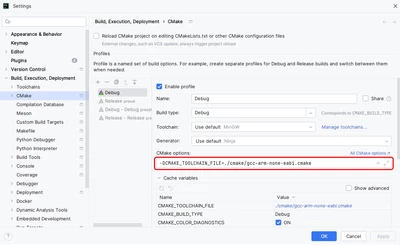
To be able to build the 6.15 projects with Clion we need to specify the toolchain file in the Clion project:

- Go to menu File -> Settings -> Build, Execution, Deployment -> CMake

- In “CMake options” field , we need to add the toolchain file variable for GCC :

     -DCMAKE_TOOLCHAIN_FILE=./cmake/gcc-arm-none-eabi.cmake

MahmoudBenRomdhane_0-1753113464028.png


Note: To use starm-clng instead of gcc, you need to add : -DCMAKE_TOOLCHAIN_FILE=./cmake/starm-clang.cmake


Thanks.

Mahmoud

3 replies

Technical Moderator
July 15, 2025

Hello @Kairui 

First let me thank you for posting and welcome to the ST Community.

Your request is under investigation, and I will get back to you ASAP.


Thanks.

Mahmoud

To give better visibility on the answered topics, please click on Accept as Solution on the reply which solved your issue or answered your question.
Visitor II
July 16, 2025

I encountered the same issue when using CLion with STM32CubeMX version 6.15, but there was no problem with version 6.14.

[2/34] Building ASM object CMakeFiles/RobotController.dir/startup_stm32h723xx.s.o
FAILED: CMakeFiles/RobotController.dir/startup_stm32h723xx.s.o 
/usr/bin/cc -DDEBUG -DSTM32H723xx -DSTM32_THREAD_SAFE_STRATEGY=2 -DUSE_HAL_DRIVER -DUSE_PWR_LDO_SUPPLY -I/home/sw/Downloads/RobotController-master/cmake/stm32cubemx/../../Core/Inc -I/home/sw/Downloads/RobotController-master/cmake/stm32cubemx/../../Drivers/STM32H7xx_HAL_Driver/Inc -I/home/sw/Downloads/RobotController-master/cmake/stm32cubemx/../../Drivers/STM32H7xx_HAL_Driver/Inc/Legacy -I/home/sw/Downloads/RobotController-master/cmake/stm32cubemx/../../Drivers/CMSIS/Device/ST/STM32H7xx/Include -I/home/sw/Downloads/RobotController-master/cmake/stm32cubemx/../../Drivers/CMSIS/Include -g -MD -MT CMakeFiles/RobotController.dir/startup_stm32h723xx.s.o -MF CMakeFiles/RobotController.dir/startup_stm32h723xx.s.o.d -o CMakeFiles/RobotController.dir/startup_stm32h723xx.s.o -c /home/sw/Downloads/RobotController-master/startup_stm32h723xx.s
/home/sw/Downloads/RobotController-master/startup_stm32h723xx.s: Assembler messages:
/home/sw/Downloads/RobotController-master/startup_stm32h723xx.s:27: 错误: unknown pseudo-op: `.syntax'
/home/sw/Downloads/RobotController-master/startup_stm32h723xx.s:28: 错误: unknown pseudo-op: `.cpu'
/home/sw/Downloads/RobotController-master/startup_stm32h723xx.s:29: 错误: unknown pseudo-op: `.fpu'
/home/sw/Downloads/RobotController-master/startup_stm32h723xx.s:30: 错误: unknown pseudo-op: `.thumb'
/home/sw/Downloads/RobotController-master/startup_stm32h723xx.s:61: 错误: no such instruction: `ldr sp,=_estack'
/home/sw/Downloads/RobotController-master/startup_stm32h723xx.s:64: 错误: no such instruction: `bl ExitRun0Mode'
/home/sw/Downloads/RobotController-master/startup_stm32h723xx.s:66: 错误: no such instruction: `bl SystemInit'
/home/sw/Downloads/RobotController-master/startup_stm32h723xx.s:69: 错误: no such instruction: `ldr r0,=_sdata'
/home/sw/Downloads/RobotController-master/startup_stm32h723xx.s:70: 错误: no such instruction: `ldr r1,=_edata'
/home/sw/Downloads/RobotController-master/startup_stm32h723xx.s:71: 错误: no such instruction: `ldr r2,=_sidata'
/home/sw/Downloads/RobotController-master/startup_stm32h723xx.s:72: 警告: `r3' is not valid here (expected `(%rsi)')
/home/sw/Downloads/RobotController-master/startup_stm32h723xx.s:72: 错误: expecting operand after ','; got nothing
/home/sw/Downloads/RobotController-master/startup_stm32h723xx.s:73: 错误: no such instruction: `b LoopCopyDataInit'
/home/sw/Downloads/RobotController-master/startup_stm32h723xx.s:76: 错误: no such instruction: `ldr r4,[r2,r3]'
/home/sw/Downloads/RobotController-master/startup_stm32h723xx.s:77: 错误: missing ']'
/home/sw/Downloads/RobotController-master/startup_stm32h723xx.s:77: 错误: too many memory references for `str'
/home/sw/Downloads/RobotController-master/startup_stm32h723xx.s:78: 错误: expecting operand after ','; got nothing
/home/sw/Downloads/RobotController-master/startup_stm32h723xx.s:81: 错误: too many memory references for `add'
/home/sw/Downloads/RobotController-master/startup_stm32h723xx.s:82: 错误: operand size mismatch for `cmp'
/home/sw/Downloads/RobotController-master/startup_stm32h723xx.s:83: 错误: no such instruction: `bcc CopyDataInit'
/home/sw/Downloads/RobotController-master/startup_stm32h723xx.s:85: 错误: no such instruction: `ldr r2,=_sbss'
/home/sw/Downloads/RobotController-master/startup_stm32h723xx.s:86: 错误: no such instruction: `ldr r4,=_ebss'
/home/sw/Downloads/RobotController-master/startup_stm32h723xx.s:87: 警告: `r3' is not valid here (expected `(%rsi)')
/home/sw/Downloads/RobotController-master/startup_stm32h723xx.s:87: 错误: expecting operand after ','; got nothing
/home/sw/Downloads/RobotController-master/startup_stm32h723xx.s:88: 错误: no such instruction: `b LoopFillZerobss'
/home/sw/Downloads/RobotController-master/startup_stm32h723xx.s:91: 错误: number of operands mismatch for `str'
/home/sw/Downloads/RobotController-master/startup_stm32h723xx.s:92: 错误: expecting operand after ','; got nothing
/home/sw/Downloads/RobotController-master/startup_stm32h723xx.s:95: 错误: operand size mismatch for `cmp'
/home/sw/Downloads/RobotController-master/startup_stm32h723xx.s:96: 错误: no such instruction: `bcc FillZerobss'
/home/sw/Downloads/RobotController-master/startup_stm32h723xx.s:99: 错误: no such instruction: `bl __libc_init_array'
/home/sw/Downloads/RobotController-master/startup_stm32h723xx.s:101: 错误: no such instruction: `bl main'
/home/sw/Downloads/RobotController-master/startup_stm32h723xx.s:102: 错误: no such instruction: `bx lr'
/home/sw/Downloads/RobotController-master/startup_stm32h723xx.s:115: 错误: no such instruction: `b Infinite_Loop'
/home/sw/Downloads/RobotController-master/startup_stm32h723xx.s:322: 错误: unknown pseudo-op: `.thumb_set'
/home/sw/Downloads/RobotController-master/startup_stm32h723xx.s:325: 错误: unknown pseudo-op: `.thumb_set'
/home/sw/Downloads/RobotController-master/startup_stm32h723xx.s:328: 错误: unknown pseudo-op: `.thumb_set'
/home/sw/Downloads/RobotController-master/startup_stm32h723xx.s:331: 错误: unknown pseudo-op: `.thumb_set'
/home/sw/Downloads/RobotController-master/startup_stm32h723xx.s:334: 错误: unknown pseudo-op: `.thumb_set'
/home/sw/Downloads/RobotController-master/startup_stm32h723xx.s:337: 错误: unknown pseudo-op: `.thumb_set'
/home/sw/Downloads/RobotController-master/startup_stm32h723xx.s:340: 错误: unknown pseudo-op: `.thumb_set'
/home/sw/Downloads/RobotController-master/startup_stm32h723xx.s:343: 错误: unknown pseudo-op: `.thumb_set'
/home/sw/Downloads/RobotController-master/startup_stm32h723xx.s:346: 错误: unknown pseudo-op: `.thumb_set'
/home/sw/Downloads/RobotController-master/startup_stm32h723xx.s:349: 错误: unknown pseudo-op: `.thumb_set'
/home/sw/Downloads/RobotController-master/startup_stm32h723xx.s:352: 错误: unknown pseudo-op: `.thumb_set'
/home/sw/Downloads/RobotController-master/startup_stm32h723xx.s:355: 错误: unknown pseudo-op: `.thumb_set'
/home/sw/Downloads/RobotController-master/startup_stm32h723xx.s:358: 错误: unknown pseudo-op: `.thumb_set'
/home/sw/Downloads/RobotController-master/startup_stm32h723xx.s:361: 错误: unknown pseudo-op: `.thumb_set'
/home/sw/Downloads/RobotController-master/startup_stm32h723xx.s:364: 错误: unknown pseudo-op: `.thumb_set'
/home/sw/Downloads/RobotController-master/startup_stm32h723xx.s:367: 错误: unknown pseudo-op: `.thumb_set'
/home/sw/Downloads/RobotController-master/startup_stm32h723xx.s:370: 错误: unknown pseudo-op: `.thumb_set'
/home/sw/Downloads/RobotController-master/startup_stm32h723xx.s:373: 错误: unknown pseudo-op: `.thumb_set'
/home/sw/Downloads/RobotController-master/startup_stm32h723xx.s:376: 错误: unknown pseudo-op: `.thumb_set'
/home/sw/Downloads/RobotController-master/startup_stm32h723xx.s:379: 错误: unknown pseudo-op: `.thumb_set'
/home/sw/Downloads/RobotController-master/startup_stm32h723xx.s:382: 错误: unknown pseudo-op: `.thumb_set'
/home/sw/Downloads/RobotController-master/startup_stm32h723xx.s:385: 错误: unknown pseudo-op: `.thumb_set'
/home/sw/Downloads/RobotController-master/startup_stm32h723xx.s:388: 错误: unknown pseudo-op: `.thumb_set'
/home/sw/Downloads/RobotController-master/startup_stm32h723xx.s:391: 错误: unknown pseudo-op: `.thumb_set'
/home/sw/Downloads/RobotController-master/startup_stm32h723xx.s:394: 错误: unknown pseudo-op: `.thumb_set'


Technical Moderator
July 16, 2025

Hello @sunwen ,


For more investigation, I suggest please that you provide your Ioc.File.


Thanks.

Mahmoud

To give better visibility on the answered topics, please click on Accept as Solution on the reply which solved your issue or answered your question.
Visitor II
July 16, 2025

Thank you for your suggestion. I have already uploaded the .ioc file for your reference. Please let me know if any additional information is needed.

Technical Moderator
July 21, 2025

Hello @Kairui @sunwen 


The root cause of the issue is related to how the toolchain file was specified in previous MX versions.

Previously, the toolchain file was defined in two locations: CMakePresets.cmake and CMakeLists.txt.

Starting with version 6.15, the specification in CMakeLists.txt has been removed, and it is now retained only in CMakePresets.cmake. This change was made to eliminate redundancy and to simplify switching between GCC and starm-clang .

To be able to build the 6.15 projects with Clion we need to specify the toolchain file in the Clion project:

- Go to menu File -> Settings -> Build, Execution, Deployment -> CMake

- In “CMake options” field , we need to add the toolchain file variable for GCC :

     -DCMAKE_TOOLCHAIN_FILE=./cmake/gcc-arm-none-eabi.cmake

MahmoudBenRomdhane_0-1753113464028.png


Note: To use starm-clng instead of gcc, you need to add : -DCMAKE_TOOLCHAIN_FILE=./cmake/starm-clang.cmake


Thanks.

Mahmoud

To give better visibility on the answered topics, please click on Accept as Solution on the reply which solved your issue or answered your question.
KairuiAuthor
Associate
July 24, 2025

Thank you so much for the explanation! That resolved my issue and the project compiles now. I've posted about this on JetBrain's CLion forum. I hope that they can perhaps make some updates to their documentation for loading CubeMX projects.