
Senior III
January 13, 2026
Solved

Code generation issue with Discovery board B-L072Z-LRWAN1

  • January 13, 2026
  • 3 replies
  • 526 views

I have a Discovery board B-L072Z-LRWAN1 and I am trying to set up a project using CubeIDE but get the following,
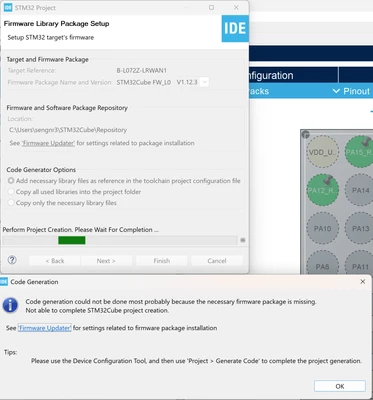
NicRoberts_0-1768308697317.png

So I check to see if the L0 & LRWAN packages are in the repository,
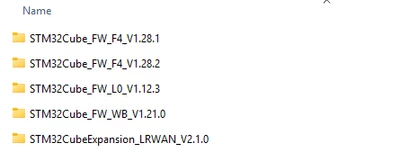
NicRoberts_1-1768308848946.png

Yes, they're there. I click OK & Cube carries on setting itself up & up pops the ioc window. I press configure & generate & get some C code but the build option is greyed out.


What am I missing here?


Best answer by NicRoberts

OK so no idea why that was happening as a solution though I've upgraded to CubeIDE 2.0 & initialized all the boiler plate code with CubeMX separately. All imported & built with with no issues.

(note: I'm liking the separation of IDE & MX, IDE opens sooooooo much quicker now) 

3 replies

Andrew Neil
Super User
January 13, 2026

What versions of CubeIDE and CubeMX are you using?


Note that CubeIDE v2.0.0 no longer integrates CubeMX - they are now separate, standalone tools:

STM32CubeIDE 2.0.0 new workflow tutorial

IDE Version 2.0.0 - why remove MX ?

STM32CubeIDE 2.0.0 released

A complex system that works is invariably found to have evolved from a simple system that worked.A complex system designed from scratch never works and cannot be patched up to make it work.
Senior III
January 13, 2026

version 1.17.0

NicRobertsAuthorBest answer
Senior III
January 14, 2026

OK so no idea why that was happening as a solution though I've upgraded to CubeIDE 2.0 & initialized all the boiler plate code with CubeMX separately. All imported & built with with no issues.

(note: I'm liking the separation of IDE & MX, IDE opens sooooooo much quicker now) 

mattias norlander
ST Employee
January 14, 2026

Hi @NicRoberts ,

I am fairly convincned that the issue is MX/FW related rather that IDE related... Let me explain the process: 

  1. When MX is generating resources into a new or an existing project it first tries to generate c/c++ code
  2. Once all code has been generated the the last step is to create/update IDE project files (.cproject/.project files in case of CubeIDE...).

If the first step fails, then for new projects you will not even have IDE project files.
The file tree in CubeIDE may show you source code, but without .cproject/.project files there is no description on how to build the projects, consequently the build toolbar buttons would be greyed out.

Since MX failed to detect or download the selected FW version the first step failed, as a consequence you ended up with some source code but broken .cproject file and the consequence is that the IDE has no clue how to build the source tree. It cannot even understand that this file tree is an Eclipse/CDT (CubeIDE) project.

I leave this explanation for other users who may one day this issue so that they can understand the reason why.

I understood that you resolved the issue by upgrading to latest version. Happy to hear things work for you. In theory your old IDE/MX version should also work assuming that the MX "CubeFW download/install" feature plays nicely...


Kind regards, Mattias

Senior III
January 14, 2026

Thanks Mattias, I was confused about why it wasn't finding the FW in the repository as this wasn't an issue with any of the other boards we use.