
Associate III
November 25, 2024
Solved

Configure UART3 on NUCLEO-H7S3L8 Board for use with ST-Link VCP

  • November 25, 2024
  • 2 replies
  • 3619 views

Title edited to reflect the correct board used. Changed from NUCLEO-H7A3ZI-Q to NUCLEO-H7S3L8.

Hi,
I’m trying to set up UART communication using UART3 on the NUCLEO-H7A3ZI-Q board. I have the UART3 pins (PD8 and PD9) connected to the ST-Link VCP on this board.

Do I need an external USB-UART converter to communicate through other UART pins, or should the onboard ST-Link handle the UART3 communication through VCP?
It's showing USART3 is not available.
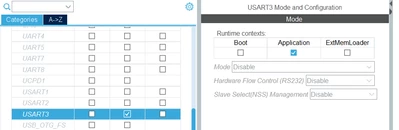
Shreayas_Acharaya_0-1732541453113.png


I’m new to this board, so I want to confirm if there’s anything I might be missing in the configuration or connections. Any guidance would be appreciated!

Thanksin advance!
Best answer by mƎALLEm

Hello,

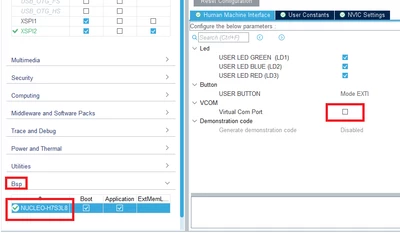
As a workaround, go to the Bsp menu and activate the Virtual Com port then deactivate it , then go back to USART3 under connectivity and you will be able to configure it. 

SofLit_0-1732705241412.png

2 replies

mƎALLEm
Technical Moderator
November 25, 2024

Hello,

If you want to use USART with PD8/PD9 with STLINK virtual comport no need to use external USB/UART bridge.

But if you need to change to other IOs using an external USB/UART bridge is a must.

But there is a workaround: you can use USART3 with other IOs and using STLINK-VCP by wiring the Tx connected to the VCP to the new Tx. Same for Rx.

Attached an ioc file where USART3 is enabled on NUCLEO-H7A3ZI-Q board.

"To give better visibility on the answered topics, please click on ""Accept as Solution"" on the reply which solved your issue or answered your question."
Andrew Neil
Super User
November 26, 2024

@mƎALLEm wrote:

If you want to use USART with PD8/PD9 with STLINK virtual comport no need to use external USB/UART bridge.

But if you need to change to other IOs, using an external USB/UART bridge is a must.


@Shreayas_Acharaya See this  post:

https://community.st.com/t5/stm32-mcus-products/stm32f4-nucleo-f429zi-unable-to-communicate-with-hmi-via-rs232/m-p/747246/highlight/true#M267271

It explains when the ST-Link's VCP can be used, and when a separate USB-to-UART converter is required.

(It is for a different board, but the same principles apply)

A complex system that works is invariably found to have evolved from a simple system that worked.A complex system designed from scratch never works and cannot be patched up to make it work.
mƎALLEm
mƎALLEmBest answer
Technical Moderator
November 27, 2024

Hello,

As a workaround, go to the Bsp menu and activate the Virtual Com port then deactivate it , then go back to USART3 under connectivity and you will be able to configure it. 

SofLit_0-1732705241412.png

"To give better visibility on the answered topics, please click on ""Accept as Solution"" on the reply which solved your issue or answered your question."