Associate III
November 25, 2024
Solved

Configure UART3 on NUCLEO-H7S3L8 Board for use with ST-Link VCP

  • November 25, 2024
  • 2 replies
  • 3629 views

Title edited to reflect the correct board used. Changed from NUCLEO-H7A3ZI-Q to NUCLEO-H7S3L8.

Hi,
I’m trying to set up UART communication using UART3 on the NUCLEO-H7A3ZI-Q board. I have the UART3 pins (PD8 and PD9) connected to the ST-Link VCP on this board.

Do I need an external USB-UART converter to communicate through other UART pins, or should the onboard ST-Link handle the UART3 communication through VCP?
It's showing USART3 is not available.
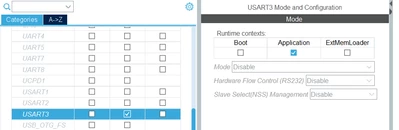
Shreayas_Acharaya_0-1732541453113.png


I’m new to this board, so I want to confirm if there’s anything I might be missing in the configuration or connections. Any guidance would be appreciated!

Thanksin advance!
Best answer by mƎALLEm

Hello,

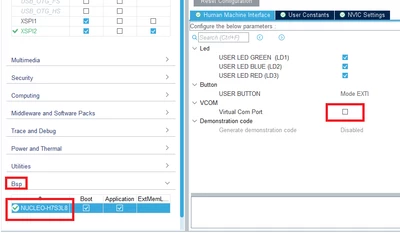
As a workaround, go to the Bsp menu and activate the Virtual Com port then deactivate it , then go back to USART3 under connectivity and you will be able to configure it. 

SofLit_0-1732705241412.png

2 replies

mƎALLEm
Technical Moderator
November 25, 2024

Hello,

If you want to use USART with PD8/PD9 with STLINK virtual comport no need to use external USB/UART bridge.

But if you need to change to other IOs using an external USB/UART bridge is a must.

But there is a workaround: you can use USART3 with other IOs and using STLINK-VCP by wiring the Tx connected to the VCP to the new Tx. Same for Rx.

Attached an ioc file where USART3 is enabled on NUCLEO-H7A3ZI-Q board.

Andrew Neil
Super User
November 26, 2024

@mƎALLEm wrote:

If you want to use USART with PD8/PD9 with STLINK virtual comport no need to use external USB/UART bridge.

But if you need to change to other IOs, using an external USB/UART bridge is a must.


@Shreayas_Acharaya See this  post:

https://community.st.com/t5/stm32-mcus-products/stm32f4-nucleo-f429zi-unable-to-communicate-with-hmi-via-rs232/m-p/747246/highlight/true#M267271

It explains when the ST-Link's VCP can be used, and when a separate USB-to-UART converter is required.

(It is for a different board, but the same principles apply)

mƎALLEm
mƎALLEmBest answer
Technical Moderator
November 27, 2024

Hello,

As a workaround, go to the Bsp menu and activate the Virtual Com port then deactivate it , then go back to USART3 under connectivity and you will be able to configure it. 

SofLit_0-1732705241412.png