
Senior
September 17, 2025
Solved

Configuring STM32F401 USART6 for 115200 baud results in 38400 baud

  • September 17, 2025
  • 2 replies
  • 460 views

I used STM32CubeMX to configure an STM32F401RETx USART6 for 115200 baud. I searched but could not find an example to start from. I enabled USART to register USART callbacks using the STM32MXCube Project Manager Advanced Settings. My project utilizes FreeRTOS, so I added that and created a simple default task to receive a character and output a message each time a character is received.

I used an FTDI TTL-232-RG-VIP-WE cable connected to GND, 3V3, PC6, and PC7, and to a Windows PC set for 115200/8/N/1.

At run time, I set a breakpoint where the character should appear in my receive buffer, and observed that I was getting garbage in. Also, I saw I was getting garbage out. I stepped the initialization, configuration, interrupts, and callbacks — all appeared to be working correctly.

In desperation, I experimented with the baud rate and found that I could send and receive good characters with the PC set to 38400 baud while the STM32F401 remained configured for 115200.

 What is going on here? The project is attached.
Best answer by TDK

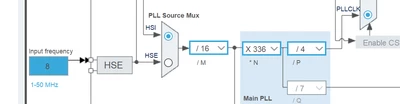
If I create a new project with that board and enable HSE bypass (or crystal), it sets it to 8 MHz.

TDK_0-1758196343653.png


I don't know how you got 24 MHz there.

2 replies

Andrew Neil
Super User
September 17, 2025

Something in your calculations is out by a factor of 3

A complex system that works is invariably found to have evolved from a simple system that worked.A complex system designed from scratch never works and cannot be patched up to make it work.
Senior
September 17, 2025

I don't think so. I made no calculations. The configuration was done entirely by STM32CubeMX. I walked through the code and the block rate being read correctly and the baudrate value was correct, as well. That leaves the math done by the macros that figure out the BRR setting, but does not seem possible. 

Andrew Neil
Super User
September 18, 2025

So, as @TDK said, something in your CubeMX doesn't match your actual hardware - eg, your clock is actually 8MHz, but you have 24MHz in CubeMX.

This is why it's important to include target hardware details - see: 

How to write your question to maximize your chances to find a solution

A complex system that works is invariably found to have evolved from a simple system that worked.A complex system designed from scratch never works and cannot be patched up to make it work.
TDK
Super User
September 18, 2025

You have HSE set to 24 MHz. Are you sure it isn't 8 MHz? What hardware is this?

TDK_0-1758156371763.png


"If you feel a post has answered your question, please click ""Accept as Solution""."