

AMARI.4
Associate
August 13, 2021
Solved

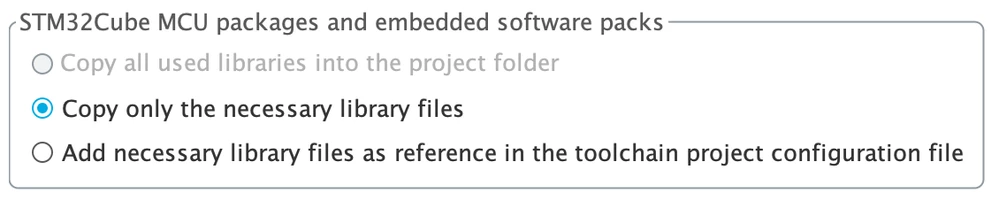
"Copy all used libraries into the project folder" option is greyed out / disabled

  • August 13, 2021
  • 1 reply
  • 5028 views

Hi - I am new to CubeIDE and CubeMX. I am following the "Getting started with STM32" tutorial, currently in "Step 2: Blinking LED with STM32CubeMX and HAL" which recommends using this option when generating code: "Copy all used libraries into the project folder".

However this option is greyed out / disabled and the second option ("Copy only the necessary library files") is selected by default. Why is the first option not even available ? How can I enable it ?

I am using the latest version of CubeIDE (1.7.0) which integrated CubeMX (6.3.0). Installed on macOS Big Sur.
 

0693W00000D2NqfQAF.png

This topic has been closed for replies.
Best answer by Houda GHABRI

Hi @AMARI.4​ ,

Welcome to Cube tools world :)

I confirm the first option is always grayed when you select STM32CubeIDE as the project generation IDE to avoid compilation error.

However it is available when create a project with STM32CubeMX.

This question is always raised here and you can have more details in our expert answer :

https://community.st.com/s/question/0D50X0000CBmxP7SQJ/code-generatorcopy-all-used-libraries-into-the-project-folder-is-disabled-why

It is not possible to enable it but you can of course add manually afterwards the files you need.

Hope this helps you.

If your question is answered, please close this topic by choosing Select as Best. This will help other users find that answer faster.

Houda

1 reply

Houda GHABRI
Houda GHABRIBest answer
ST Employee
August 13, 2021

Hi @AMARI.4​ ,

Welcome to Cube tools world :)

I confirm the first option is always grayed when you select STM32CubeIDE as the project generation IDE to avoid compilation error.

However it is available when create a project with STM32CubeMX.

This question is always raised here and you can have more details in our expert answer :

https://community.st.com/s/question/0D50X0000CBmxP7SQJ/code-generatorcopy-all-used-libraries-into-the-project-folder-is-disabled-why

It is not possible to enable it but you can of course add manually afterwards the files you need.

Hope this helps you.

If your question is answered, please close this topic by choosing Select as Best. This will help other users find that answer faster.

Houda

AMARI.4
AMARI.4Author
Associate
August 13, 2021

Thanks Houda - this is very helpful !