
Associate
January 15, 2026
Solved

cubeMX:access to example selector

  • January 15, 2026
  • 3 replies
  • 682 views

When I open the official example using the example selector, CubeMX cannot display the graphical configuration of that example. I would like to know if it is possible to display the graphical configuration of the example in CubeMX. Thank you very much, because that would make learning much easier.
Best answer by Mahmoud Ben Romdhane

Hello @stm64 ,


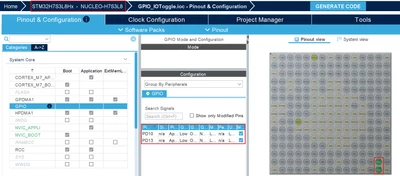
STM32CubeMX should display the GPIO Settings such as the case with Nucleo-H7S3L8.

MahmoudBenRomdhane_0-1768489978247.png

An internal ticket has been raised to the dedicated team (Ticket Number:  225239).

To activate a LED on NUCLEO-C031C6, simply configure PA5 in push-pull output mode and HCLK at 48 MHz, as indicated in the Example Readme File.


Thanks.

Mahmoud


3 replies

Technical Moderator
January 15, 2026

Hello @stm64 ,


Let me thank you for your post.

For more investigation, could you please provide which example are you using.


Thanks.

Mahmoud 

To give better visibility on the answered topics, please click on Accept as Solution on the reply which solved your issue or answered your question.
stm64Author
Associate
January 15, 2026

GPIO_IOToggle NUCLEO-C031C6  version:6.12.0

Thanks.

Technical Moderator
January 15, 2026

Hello @stm64,


Further to your comment, STM32CubeMX 6.16.1 provides an example GPIO_IOToggle with an Ioc.File.

I suggest that you select it and click on start project.

MahmoudBenRomdhane_0-1768465523572.png

MahmoudBenRomdhane_1-1768466102900.png

You can access also to the Example under the firmware path:

C:\Users\_\STM32Cube\Repository\STM32Cube_FW_C0_V1.4.0\Projects\NUCLEO C031C6\Examples\GPIO\GPIO_IOToggle

I will be waiting for your feedback.


Thanks.

Mahmoud

To give better visibility on the answered topics, please click on Accept as Solution on the reply which solved your issue or answered your question.
TDK
Super User
January 15, 2026

There's no way to change how the example is set up, but you can change a pin to be GPIO_Output and it will be initialized as such in the code.

Configuration of the pin is done in user code within the example, not from within STM32CubeMX.

TDK_0-1768484555396.png


"If you feel a post has answered your question, please click ""Accept as Solution""."
stm64Author
Associate
January 15, 2026

Thank you so much.Because I previously used Texas Instruments MCUs, their sample code could be viewed graphically in syscfg (a tool similar to cubeMX) after being imported.Hopefully, CubeMX will be officially upgraded to this level in the future.

Thanks.

Technical Moderator
January 15, 2026

Hello @stm64 ,


STM32CubeMX should display the GPIO Settings such as the case with Nucleo-H7S3L8.

MahmoudBenRomdhane_0-1768489978247.png

An internal ticket has been raised to the dedicated team (Ticket Number:  225239).

To activate a LED on NUCLEO-C031C6, simply configure PA5 in push-pull output mode and HCLK at 48 MHz, as indicated in the Example Readme File.


Thanks.

Mahmoud


To give better visibility on the answered topics, please click on Accept as Solution on the reply which solved your issue or answered your question.
Andrew Neil
Super User
January 15, 2026

@stm64 wrote:

CubeMX cannot display the graphical configuration of that example.


Presumably because that particular example didn't have a graphical project (.ioc file) ?

Not all examples have a .ioc file

How to tell if an example has a .ioc file

A complex system that works is invariably found to have evolved from a simple system that worked.A complex system designed from scratch never works and cannot be patched up to make it work.
stm64Author
Associate
January 16, 2026

Thank you very much. I found that although GPIO_IOToggle and GPIO_EXIT for NUCLEO-C031C6 show that they contain IOC files, these two example files are corrupted, making the configuration unviewable in cubeMX. All other examples are working correctly.

Thanks.

Andrew Neil
Super User
January 16, 2026

@stm64 wrote:

 these two example files are corrupted.


Please give more details of that?

A complex system that works is invariably found to have evolved from a simple system that worked.A complex system designed from scratch never works and cannot be patched up to make it work.