Associate
January 9, 2026
Solved

CubeMX DMA code not generate in IDE 2.0 project (Nucleo F746ZG)

  • January 9, 2026
  • 4 replies
  • 622 views

Hi,

I'm probably doing wrong as a newbie in STM32 programmation:

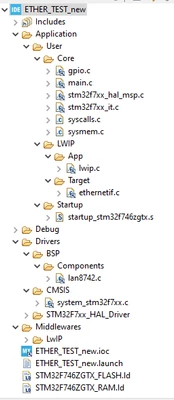
I try to generate this configuration code for dma but I can't see any dma.c file in the project folder.

(I did refresh the project after generating the code)

Thanks for help
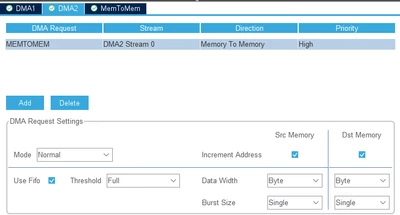
 

Segal_0-1767733670669.png

Segal_1-1767733826565.pngSegal_2-1767733906164.png


Best answer by TDK

The project needs to be added to the workspace correctly.

First, remove it from the workspace. Then, either:

  • After clicking Generate Code, press the "Open Project" button
  • or, Open the .project file from the filesystem.

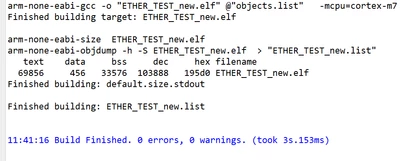
If you do that, it will build successfully:

TDK_0-1768063291418.png


4 replies

Technical Moderator
January 9, 2026

Hello @Segal 

Let me thank you for posting and welcome to the ST Community.

For more investigation, I suggest that you provide your Ioc.File.

Thanks.

Mahmoud

To give better visibility on the answered topics, please click on Accept as Solution on the reply which solved your issue or answered your question.
SegalAuthor
Associate
January 10, 2026

Hi Mahmoud,

I attached the .ioc 

Thank you


SegalAuthor
Associate
January 10, 2026

Hi there,

Maybe a part of my issue: the project was not save in the CubeIDE workspace.

Now that I copied it in the workspace I can see the right files tree:

Segal_0-1768057581706.png

But I get a new problem: I can't build the project neither save it. Some Icons are not actives in the Toolbar.

Segal_1-1768058027340.png

What I Am doing wrong?


Thanks for help


Technical Moderator
January 12, 2026

Hello @Segal ,


As mentioned @TDK, the project was generated correctly and the compilation completed without any errors.

MahmoudBenRomdhane_0-1768207407803.png

I recommend that you delete the project under the workspace and regenerate the code.


Thanks.

Mahmoud


To give better visibility on the answered topics, please click on Accept as Solution on the reply which solved your issue or answered your question.
TDK
TDKBest answer
Super User
January 10, 2026

The project needs to be added to the workspace correctly.

First, remove it from the workspace. Then, either:

  • After clicking Generate Code, press the "Open Project" button
  • or, Open the .project file from the filesystem.

If you do that, it will build successfully:

TDK_0-1768063291418.png


"If you feel a post has answered your question, please click ""Accept as Solution""."