Associate
February 26, 2025
Solved

CubeMX hanging in generating code...

  • February 26, 2025
  • 2 replies
  • 970 views

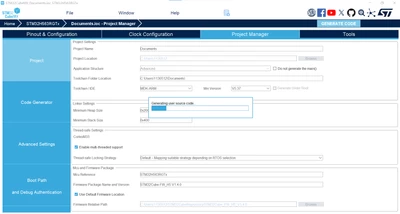
I'm freezing on the following screen, is there anything I can do?
Ryan213_0-1740532773650.png

TK

Best answer by kurtmicke

Thanks for info. In fact I got it to work today. I did two things:

1. Deleting .\Users\<username> and delete .stm32cubemx folder. Got the idea from Reddit...

After this I tested, no difference.

2. Filling in project name and location.

Tested again, Da da! working,

So probably the problem was on top of the keyboard.

2 replies

STTwo-32
Technical Moderator
February 26, 2025

Hello @Ryan213 and welcome to the ST Community. 
Could you try to uninstall and reinstall it or at least restart your PC.

PS: make sure that you are using the last version of the STM32CubeMX. (V6.13.0)

Best Regards.

STTwo-32

Ryan213Author
Associate
March 4, 2025

I've reinstall and upgraded to version 16.4, but I'm still stuck on the following screen.

Ryan213_0-1741065421850.png


Ryan213_1-1741065421623.png


Is there anything else I can try? Or if the CubeIDE has this feature built in.

Visitor II
March 6, 2025

Hello I have exactly the same problem. Installed latest version yesterday. Have you been able to solve the problem?

BR Micke

kurtmickeBest answer
Visitor II
March 6, 2025

Thanks for info. In fact I got it to work today. I did two things:

1. Deleting .\Users\<username> and delete .stm32cubemx folder. Got the idea from Reddit...

After this I tested, no difference.

2. Filling in project name and location.

Tested again, Da da! working,

So probably the problem was on top of the keyboard.

Ryan213Author
Associate
March 7, 2025

Its work!
thank you  kurtmicke .
