
Associate
July 31, 2024
Question

CubeMX not generating code

  • July 31, 2024
  • 3 replies
  • 4651 views

Hello all, 
I recently install CubeIDE and I want to do a blinky example on the User led for the nucleo-U545RE
I see that the GPIO for the USER LED is PA5 
So in cubeIDE, I open CubeMX, configure PA5 PIN TO GPIO_OUTPUT and try to generate the code by clicking on the button "Device configuration tool Code Generation", but nothing happens
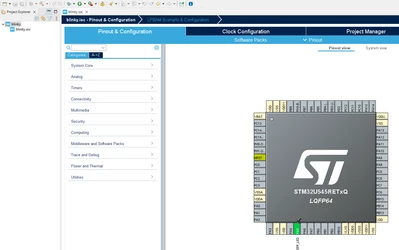
2345.png

Can someone explain me why the generation is not working ? 
Thanks

3 replies

ELABI.1
Technical Moderator
July 31, 2024

Hello @estora 

I'm not able to reproduce this issue. Can you try to generate the new project from scrach following those steps:

  • Open CubeIDE (Last Version 1.16.0 now) and select File > New > STM32 Project.
  • Select the board you are going to use (from the Board selector tab) and click on next.
  • Then, rename your project and click finish.
  • Configure your GPIO and Click on the "Device configuration tool Code Generation" button.

This should do the job.

Best Regards,

ELABI.1

To give better visibility on the answered topics, please click on Accept as Solution on the reply which solved your issue or answered your question.
estoraAuthor
Associate
July 31, 2024

Thanks @ELABI.1  for your response
I tried your procedure but it didn't work 

When i click on the button "Device configuration tool Code Generation"
There is a "window" that appear and disappear so fast that i can't see what's inside 
Maybe it can help you to find the issue 
Thanks for your help

ELABI.1
Technical Moderator
August 1, 2024

Hello @estora 

I think that you are facing a network connection and login issues for that please refer to this FAQ How to set the network connection parameters for S... - STMicroelectronics Community and check your network connection. Please don't forgot also to be logged before generating the code.

Please let me know if the issue is solved or not ?

Thank you.

Best regards,

ELABI.1


To give better visibility on the answered topics, please click on Accept as Solution on the reply which solved your issue or answered your question.
Visitor II
October 29, 2025

There is still a problem:

I am using MxCube Version 6.15.0 andSTM32CubeIde Version 1.19.0 on Debian Linux. When I try to generate code  I get a stall. All ./Drivers are deleted and not generated. The Program aborts wihout regenerate .project and .cproject. Only by git I can get my files back. I tried to reinstall - without success - STMCUBE_MX

mxFreeze.png

Visitor II
October 29, 2025

I can not see the zip file which I uploaded together with the last post!!!