

debugging
Lead
February 15, 2026
Solved

CubeMX upgrade unzip failure due to program folder change

  • February 15, 2026
  • 2 replies
  • 263 views

1. Run StmCubeMX and then chose upgrade in Ubuntu

2. After download it error with something alike it cannot unzip the file.
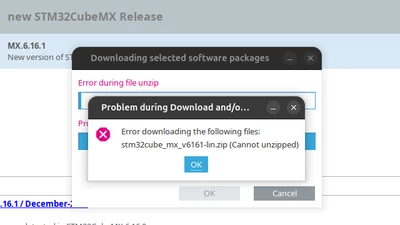
debugging_0-1771208559198.png


Reason:

1. it seems CubeMx uses the .installationinformation hidden file in its folder to find the installation folder.

INSTALL_PATHt\00$.....<your patch>/STM32CubeMXt\

These are settings  in a binary format, so there are some weird character. Anyhow it cannot be changed by user.

Solutions:

1. Move CubeMX back to where is was installed (not desired) after upgrade, move it back where  it is desired.

2. Remove and Reinstall CubeMX 

Suggested fix:

1. Make CubeMx upgrade process install folder agnostic.


Best answer by Ghofrane GSOURI

Hello @debugging 

Thank you very much for your answer.

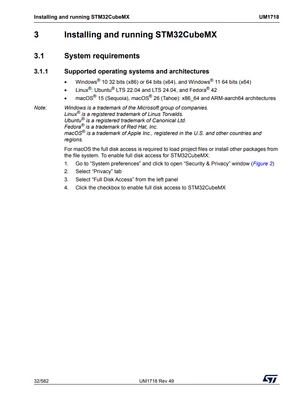
To clarify, MX 6.16.1 is supported on the following operating systems:

• Windows® 10 32 bits (x86) or 64 bits (x64), and Windows® 11 64 bits (x64)
• Linux®: Ubuntu® LTS 22.04 and LTS 24.04, and Fedora® 42
• macOS® 15 (Sequoia), macOS® 26 (Tahoe): x86_64 and ARM-aarch64 architectures

GhofraneGSOURI_0-1771314781942.png

Since Ubuntu 25.10 is not among the officially supported operating systems for MX, its behavior on this OS is not validated or guaranteed.

THX

Ghofrane

2 replies

Ghofrane GSOURI
Technical Moderator
February 16, 2026

Hello @debugging 

Please specify your Ubuntu version. Also, which MX version is installed on your PC, and  you try to migrate ?

THX

Ghofrane

To give better visibility on the answered topics, please click on Accept as Solution on the reply which solved your issue or answered your question.
Ghofrane GSOURI
Technical Moderator
February 17, 2026

Hello @debugging 

I have successfully tested an upgrade on Ubuntu 24.04, moving from MX 6.14.1 to the latest version, MX 6.16.1, without issues.

Could you please share the details of your operating system and the MX version you attempted to upgrade from and to? This information will help me reproduce and investigate the problem on my side.

THX

Ghofrane


To give better visibility on the answered topics, please click on Accept as Solution on the reply which solved your issue or answered your question.
debugging
debuggingAuthor
Lead
February 17, 2026
ubuntu 25.10.
1. move cubeMX folder to another location
2. run from the new location
3. run upgrade. fails
4. move folder back to original location
5. run upgeade. passes.
Ghofrane GSOURI
Ghofrane GSOURIBest answer
Technical Moderator
February 17, 2026

Hello @debugging 

Thank you very much for your answer.

To clarify, MX 6.16.1 is supported on the following operating systems:

• Windows® 10 32 bits (x86) or 64 bits (x64), and Windows® 11 64 bits (x64)
• Linux®: Ubuntu® LTS 22.04 and LTS 24.04, and Fedora® 42
• macOS® 15 (Sequoia), macOS® 26 (Tahoe): x86_64 and ARM-aarch64 architectures

GhofraneGSOURI_0-1771314781942.png

Since Ubuntu 25.10 is not among the officially supported operating systems for MX, its behavior on this OS is not validated or guaranteed.

THX

Ghofrane

To give better visibility on the answered topics, please click on Accept as Solution on the reply which solved your issue or answered your question.