
Associate III
November 30, 2023
Solved

CubeMX version error

  • November 30, 2023
  • 2 replies
  • 1422 views

I'm using STM32CubeIDE 1.11 and I want to import an existing file:

File --> Import --> Exsisting Projects into Workspace --> Select Root Directory

I get the following error when I try to open the .ioc file:

luke514_0-1701338365709.png

File --> Import --> Exsisting Projects into Workspace --> Select Root Directory

I downloaded version 6.8.0 from the site and installed it, but the error persists.

If possible, I would not like to upgrade STM32CubeIDE to version 1.14

Maybe I have both versions on my pc and should uninstall the older one?

How do I proceed?
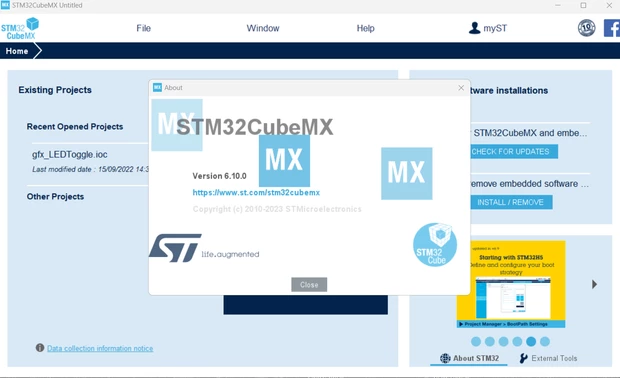
luke514_0-1701339352262.png


Thanks.

This topic has been closed for replies.
Best answer by Peter BENSCH

Well, if you're juggling different versions of CubeIDE and CubeMX, you should keep track of them so that your current problems don't occur. Yes, CubeMX is available as a standalone application (so that users of other IDEs or compilers can also benefit), as well as part of the CubeIDE-

If you only update CubeMX, an older version of CubeIDE will not be able to handle it. Conversely, a newer version of CubeIDE can import from an older IOC and then migrate the firmware if necessary. In this respect, you would be doing yourself a favor if you install the latest version of CubeIDE, which, as mentioned, is possible in parallel with previous versions.

2 replies

Peter BENSCH
Technical Moderator
November 30, 2023

At some point you will have to upgrade to the latest version because something no longer works with the old version.

But if you absolutely want to stick with the old ones, you can install several versions of both STM32CubeIDE and STM32CubeMX in parallel without any problems. Just make sure that the installation path is as short as possible and without spaces, especially for the Eclipse-based CubeIDE, otherwise you can get very irritating errors. For Windows you could install e.g. in C:\ST\CIDE1130 (for version 1.13.0) or C:\ST\CMX6092 (for version 6.9.2).

Hope that helps?

Good luck!
/Peter

luke514Author
Associate III
November 30, 2023

Hi!

Thanks for the reply.

It's not clear to me if the updating STM32CubeIDE to the latest version would solve the problem, because IDE also contains CubeMX inside (if I'm not wrong?) so maybe the solution is updating the entire CubeIDE and NOT updating only CubeMX as I have done.

The fact is that I currently have the CubeMX app updated (as seen in the picture in the main post) .. but as I just said, I am afraid that the problem is just internal to CubeIDE and so I should update it.

Peter BENSCH
Peter BENSCHBest answer
Technical Moderator
November 30, 2023

Well, if you're juggling different versions of CubeIDE and CubeMX, you should keep track of them so that your current problems don't occur. Yes, CubeMX is available as a standalone application (so that users of other IDEs or compilers can also benefit), as well as part of the CubeIDE-

If you only update CubeMX, an older version of CubeIDE will not be able to handle it. Conversely, a newer version of CubeIDE can import from an older IOC and then migrate the firmware if necessary. In this respect, you would be doing yourself a favor if you install the latest version of CubeIDE, which, as mentioned, is possible in parallel with previous versions.