Associate
August 21, 2024
Solved

External Clock Configuration

  • August 21, 2024
  • 4 replies
  • 2884 views

Hi,

I am using the STM32L031F6 MCU and have configured the internal clock, which is working properly. However, I need to configure the external clock. We observed a pin conflict when changing to the external clock configuration because we are using the PA0 pin for another purpose. In this situation, is it possible to configure the external clock?

Below is the RCC configuration:
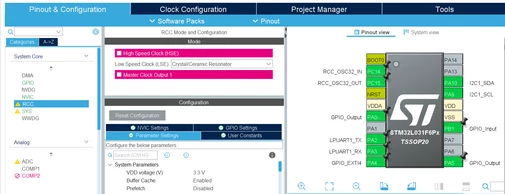
Screenshot 2024-08-21 153259.png

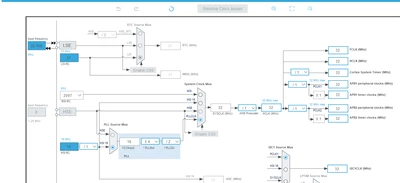
Clock configuration

Anusree_k_0-1724255752629.png


Best answer by mƎALLEm

Hello,


I need to configure the external clock. We observed a pin conflict when changing to the external clock configuration because we are using the PA0 pin for another purpose. In this situation, is it possible to configure the external clock?

You've already answered the question in your comment: conflicting with another function.

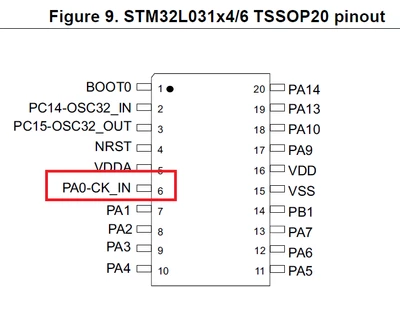
PA0 is already used in your application and in your package you need CK_IN input having the same pin as PA0 (pin 6)

SofLit_0-1724336045131.png

SofLit_1-1724336196201.png

So if you need to use CK_IN you need to replace PA0 by another GPIO pin.


4 replies

Andrew Neil
Super User
August 21, 2024

What does the Datasheet tell you?

A complex system that works is invariably found to have evolved from a simple system that worked.A complex system designed from scratch never works and cannot be patched up to make it work.
TDK
Super User
August 21, 2024

Hover over the red region to see the source of the conflict. In this case:

TDK_0-1724264174172.png


In other words, PA0 cannot be a GPIO if you want to use an external clock. There is no other pin available for this.

"If you feel a post has answered your question, please click ""Accept as Solution""."
nouirakh
ST Employee
August 22, 2024

Hello @Anusree_k 

Can you try to use HSE bypass mode, in this mode you can provide an external clock signal directly to the HSE input pin (PA0). This mode only requires PA0, and PA1 can be used for other purposes.

Steps to Configure HSE in Bypass Mode:

  1. Connect External Clock Signal to PA0: Ensure that your external clock signal is connected to the pin.
  2. Configure HSE in Bypass Mode: Update your RCC configuration to enable HSE in bypass mode.

Using the HSE in bypass mode is the best solution if you need to use an external clock and PA0 is already in use. If this is not possible, consider reassigning the functionality of PA0 or using the internal clock sources.


TDK
Super User
August 22, 2024

This reply makes no sense for a number of reasons:

  • The chip can only run in HSE bypass mode. The user is already "trying" it.
  • PA1 is not used.
"If you feel a post has answered your question, please click ""Accept as Solution""."
mƎALLEm
mƎALLEmBest answer
Technical Moderator
August 22, 2024

Hello,


I need to configure the external clock. We observed a pin conflict when changing to the external clock configuration because we are using the PA0 pin for another purpose. In this situation, is it possible to configure the external clock?

You've already answered the question in your comment: conflicting with another function.

PA0 is already used in your application and in your package you need CK_IN input having the same pin as PA0 (pin 6)

SofLit_0-1724336045131.png

SofLit_1-1724336196201.png

So if you need to use CK_IN you need to replace PA0 by another GPIO pin.


"To give better visibility on the answered topics, please click on ""Accept as Solution"" on the reply which solved your issue or answered your question."