

Egolt.1
Associate II
July 11, 2023
Question

Fail to upgrade to CubeMX 6.9.0

  • July 11, 2023
  • 1 reply
  • 1688 views

Hello,

I started the upgrade process as always under administrator rights, the download and installation finished successfully and then I need to restart with administrator rights again to fulfil the installation and I get this:
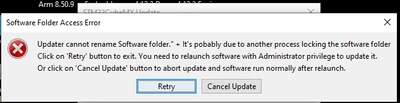
Egolt1_0-1689092574718.png

I close all the other application, I even restart the PC but still I get this.


    This topic has been closed for replies.

    1 reply

    Semer CHERNI
    ST Employee
    July 11, 2023

    Hello @Egolt.1 

    First let me thank you for posting.

    I am not able to reproduce the described behavior with my PC.

    It seems like you have an issue with access rights.

    However, could you provide these details which could help us help you:

    • the OS you are working with
    • The installation path (is it the default path?)
    • from which CubeMX you are starting

    KR,

    Semer.

    Egolt.1
    Egolt.1Author
    Associate II
    July 12, 2023

    Thank you Semer, 

    Here is my answers:

    • Edition Windows 10 Pro
      Version 22H2
      Installed on ‎19/‎09/‎20
      OS build 19045.3208
      Experience Windows Feature Experience Pack 1000.19041.1000.0
    • "C:\Program Files\STMicroelectronics\STM32Cube\STM32CubeMX_6_6_1\"
    • Egolt1_0-1689192153767.png


    Semer CHERNI
    ST Employee
    July 13, 2023

    Hello @Egolt.1 

    I made a second update using the 6.6.1 version and it also was successful.

    I believe that the issue is related to some access right with Windows.

    The only solution I propose at this stage is to download the STM32CubeMX 6.9.0 from st.com and make the install.

    KR,

    Semer.