Associate III
February 27, 2025
Solved

H743 Ethernet RMII - how to configure RAM at 0x24000000?

  • February 27, 2025
  • 3 replies
  • 1455 views

Hello.. i m working on Ethernet RMII on H743 nucleo, and encountered this error msg, could anyone advise how to configure RAM at 0x24000000? TQ!
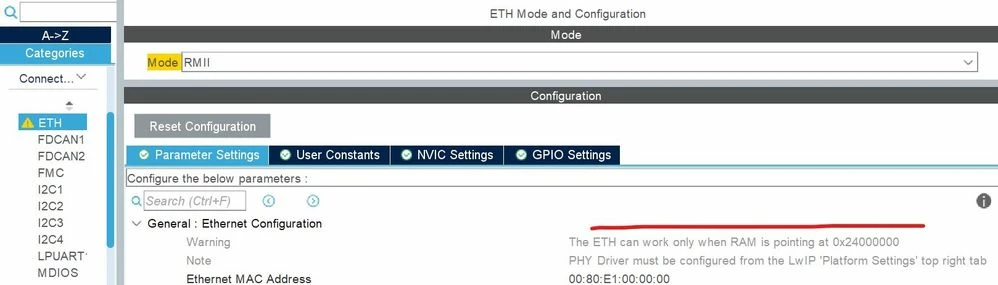

 

AndrewNeil_0-1740667457389.jpeg


Best answer by mƎALLEm

Hello, Issue fixed in the CubeMx 6.15.0. 

Please check.

3 replies

TDK
Super User
February 27, 2025

The linker file (*.ld) in the directory of the generated code describes what memory is used for RAM. Probably it's pointing to 0x24000000 by default, as opposed to DTCMRAM or somewhere the DMA can't reach.

"If you feel a post has answered your question, please click ""Accept as Solution""."
mƎALLEm
Technical Moderator
February 27, 2025

Hello,

I think the warning should be "The ETH can work only when RAM is not pointing to the DTCM-RAM" because ETH has no access to the DTCM nor ITCM.

mALLEm_0-1740677021119.png

So forget about that warning and just place your descriptors in SRAM_D2 for example (SRAM1, SRAM2, SRAM3). You can follow this article.

I will escalate that internally for modification and get back to you for any feedback. Internal ticket number 204183 not accessible by the community users.

"To give better visibility on the answered topics, please click on ""Accept as Solution"" on the reply which solved your issue or answered your question."
Karim BEN BELGACEM
ST Employee
March 3, 2025

Or simply say:

"Ethernet RX and Tx descriptors needs to be placed in a RAM memory accessible by the dedicated Ethernet DMA"


mƎALLEm
mƎALLEmBest answer
Technical Moderator
July 15, 2025

Hello, Issue fixed in the CubeMx 6.15.0. 

Please check.

"To give better visibility on the answered topics, please click on ""Accept as Solution"" on the reply which solved your issue or answered your question."
Visitor II
August 31, 2025

H755_error.png

Hi I am facing the same issue with H755ZI Nucleo in STM32CubeIDE 1.19.0 and STM32CubeMX 6.15.0

mƎALLEm
Technical Moderator
September 1, 2025

Hello @pradyum and welcome to the ST community,

This thread is closed. Please create a new thread and explain exactly what issue you are facing. 


"To give better visibility on the answered topics, please click on ""Accept as Solution"" on the reply which solved your issue or answered your question."