Associate
November 18, 2024
Question

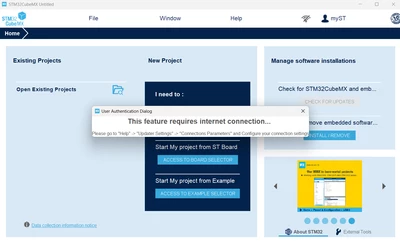
How do I login MX program?

  • November 18, 2024
  • 2 replies
  • 952 views

TaehwanChoi_0-1731945704911.png

I am a beginner.

How do I login?

I can't login MX program.


2 replies

mƎALLEm
Technical Moderator
November 18, 2024

Hello @TaehwanChoi and welcome to the community,

As shown by the message you need an internet connection to login.


SofLit_1-1731946360811.png

Then login:

SofLit_2-1731946393301.png

But you need first to create a profile in st.com. or click on Create Account button;


"To give better visibility on the answered topics, please click on ""Accept as Solution"" on the reply which solved your issue or answered your question."
Associate
November 20, 2024

Hi. Thank you for reply.

I already have a account.

But, I can't login on MX program yet. 

I think it is related to internet connection.

I am connecting to the internet by WiFi.

Just in case, Is connection-way only by Ethernet?

Sincerely,

Taehwan Choi

mƎALLEm
Technical Moderator
November 20, 2024

You can connect either with WiFi or Ethernet cable or even 4G/5G.. no matter the media is .. the most important is the internet connection.

Try to check CubeMx internet connection: 

SofLit_0-1732119044500.png

then go to Connection parameters and click on "Check Connection". You need to get a green status like shown in the following figure:

SofLit_1-1732119106653.png

Otherwise check your proxy parameters. In that case try to select select "Use System Proxy Parameters".


"To give better visibility on the answered topics, please click on ""Accept as Solution"" on the reply which solved your issue or answered your question."

Associate
November 27, 2024
Sorry I am late.
I have a problem yet.
as below picture,
 
TaehwanChoi_2-1732722253341.png


I really would like to use your board(F103-RB).... I don't know why i have a problem....