Associate
September 20, 2024
Solved

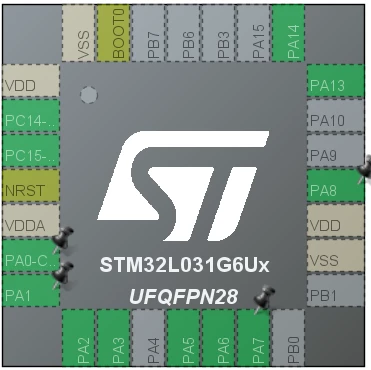
In CubeMX, why are some chip pins shown in dashed boxes?
  • September 20, 2024
  • 2 replies
  • 809 views

Leslie_Yuan_0-1726798401306.png

In CubeMX, why are some chip pins shown in dashed boxes? 

Best answer by TDK

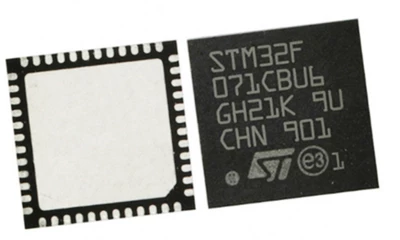
This is a UFQFN48 chip, which doesn't have leads. It shows in the dashed boxes because the pads are on the bottom of the chip and it's trying to visually replicate the layout.
TDK_0-1726803965724.png


On LQFP they're shown on the outside of the chip. On BGAs they're shown as circles on the chip where the balls are underneath.

2 replies

Karl Yamashita
Principal
September 20, 2024

What do you mean by "dashed boxes"?

Or do you mean by dashes in the names? If the names, then it's just long names that don't fit. If you hover over the pins then you'll see the full name

If a reply has proven helpful, click on Accept as Solution so that it'll show at top of the post.CAN Jammer an open source CAN bus hacking toolCANableV3 Open Source
TDK
TDKBest answer
Super User
September 20, 2024

This is a UFQFN48 chip, which doesn't have leads. It shows in the dashed boxes because the pads are on the bottom of the chip and it's trying to visually replicate the layout.

TDK_0-1726803965724.png


On LQFP they're shown on the outside of the chip. On BGAs they're shown as circles on the chip where the balls are underneath.

"If you feel a post has answered your question, please click ""Accept as Solution""."
Associate
September 30, 2024

That makes sense! Thank you for your reply!