
Associate III
October 8, 2024
Solved

Issue to select TouchfGx 4.24.1 version in CubeMx

  • October 8, 2024
  • 2 replies
  • 2672 views

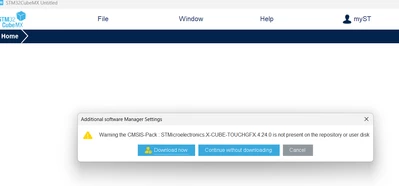
I use touchfgx 4.24.1 Designer to generate a new project. After generating it, I use this stm32cubemx 6.12.1 to open the stm32cubeProject. It will say that my stm32cubemx 6.12.1 does not have touchfgx 4.24.0 installed, and it wants me to install touchfgx 4.24. 0.
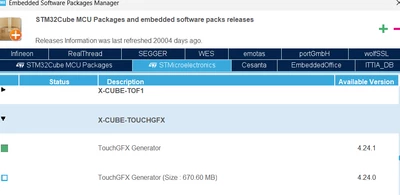
My question is, I obviously used the 4.24.1 version of the project, why do I need to install touchfgx 4.24.0 when opening the stm32cubeProject project in stm32cubemx 6.12.1? I am sure that my stm32cubemx has touchfgx 4.24.1 installed.
Kenwang_0-1728385608778.png


Kenwang_1-1728385664740.png


Best answer by mƎALLEm

Did you try to migrate instead to continue?

2 replies

mƎALLEm
Technical Moderator
October 9, 2024

Hello,

Don't know if you have used the version 4.24.0 before, but try to set the TouchGFX version from "Select components":

SofLit_2-1728484644573.png

Then:


SofLit_0-1728484581244.png

Finally, accept the migration:

SofLit_3-1728484705388.png

At this stage TouchGFX V4.24.1 is set to your project.

Hope it helps.


"To give better visibility on the answered topics, please click on ""Accept as Solution"" on the reply which solved your issue or answered your question."
KenwangAuthor
Associate III
October 11, 2024

I previously used version 4.24.0, but I have since removed it from my computer. Currently, I only have version 4.24.1 installed.

After installing version 4.24.1, I created a new project. However, when I opened the project in STM32CubeMX to configure the RTC and ADC settings, it indicated that the TouchGFX version in use is 4.24.0, not 4.24.1.

I find this quite puzzling since I clearly created the project using version 4.24.1. Why does STM32CubeMX report that the project was generated with version 4.24.0 and prompt me to install that version of TouchGFX?

Could it be that there was an issue with the parameters when TouchGFX generated the new project, leading to this discrepancy?

mƎALLEm
Technical Moderator
October 11, 2024

If you have created the project with TouchGFX V4.24.0, CubeMx will ask you to use that version unless you change the version to V4.24.1 like I show you in my previous comment.

Did you apply these steps?

"To give better visibility on the answered topics, please click on ""Accept as Solution"" on the reply which solved your issue or answered your question."
KenwangAuthor
Associate III
October 14, 2024

Maybe I didn't make it clear. I use version 4.24.1 to create a new project, so I expect that when I use cubemx to open it, cubemx will also know that I use version 4.24.1 to create the project. , instead of asking me to install version 4.24.0 of touchgfx.

mƎALLEm
Technical Moderator
October 14, 2024

You can do it manually as I described previously.

"To give better visibility on the answered topics, please click on ""Accept as Solution"" on the reply which solved your issue or answered your question."