Missing USB CDC Middleware Files After Code Generation (STM32F103C8T6 / Nucleo-F334R8, MDK-ARM)
Hello everyone,
I'm new to STM32 and currently working on a USB CDC (Virtual COM Port) project using STM32CubeMX with the following setup:
MCUs/Boards: STM32F103C8T6 and Nucleo-F334R8
Toolchain / IDE: MDK-ARM (Keil µVision)
STM32CubeMX versions tested: 6.14.1 and 6.12.1
I configured the USB peripheral in Device Only mode and enabled the Communication Device Class (CDC) in the USB Device middleware settings. I also configured the required USB pins (PA11 as USB_DM and PA12 as USB_DP) and set the USB clock source properly to ensure 48 MHz operation.
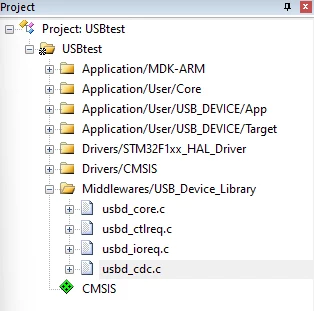
However, after generating the project, several key USB middleware source files are missing, such as:
usbd_core.c
usbd_ctlreq.c
usbd_ioreq.c
usbd_cdc.c
(and sometimes also usbd_cdc_if.c)
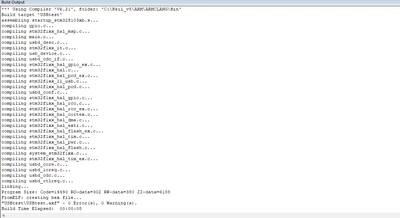
Because of this, the code fails to compile due to missing function references.
What I’ve Tried:
Verified USB pins (PA11, PA12) are configured
Mode is set to Device_Only
CDC class is selected in middleware
USB clock is 48 MHz via PLL
Enabled code generation options like "Delete previously generated files"
Completely deleted and regenerated the project multiple times
Tried both STM32CubeMX 6.14.1 and 6.12.1
Tried both STM32F103C8T6 and Nucleo-F334R8 as targets
Despite all that, the USB CDC middleware files still fail to appear in the generated code.
Additional Note:
I have confirmed that the middleware packages are installed in CubeMX, and I also reinstalled the STM32CubeF1 firmware package just to be sure.
I’m attaching my .ioc file below for reference.
My Questions:
Is this a known issue or limitation with STM32CubeMX when using the MDK-ARM toolchain?
Is there a manual way to force CubeMX to include the USB middleware files?
Am I missing any additional configuration step?
Thank you in advance for your help!
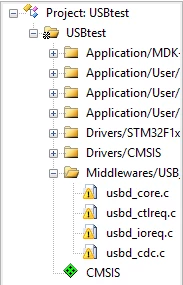 It's my 2nd day using STM32, i don't know what to do and here's the screenshoot