

DMukh.2
Associate
April 18, 2023
Solved

No SDIO in CubeMX

  • April 18, 2023
  • 4 replies
  • 3097 views

Good afternoon.

I am using BluePill STM32F103C8T6 board.

I wanted to connect an SD card to it and use it as Mass Storage
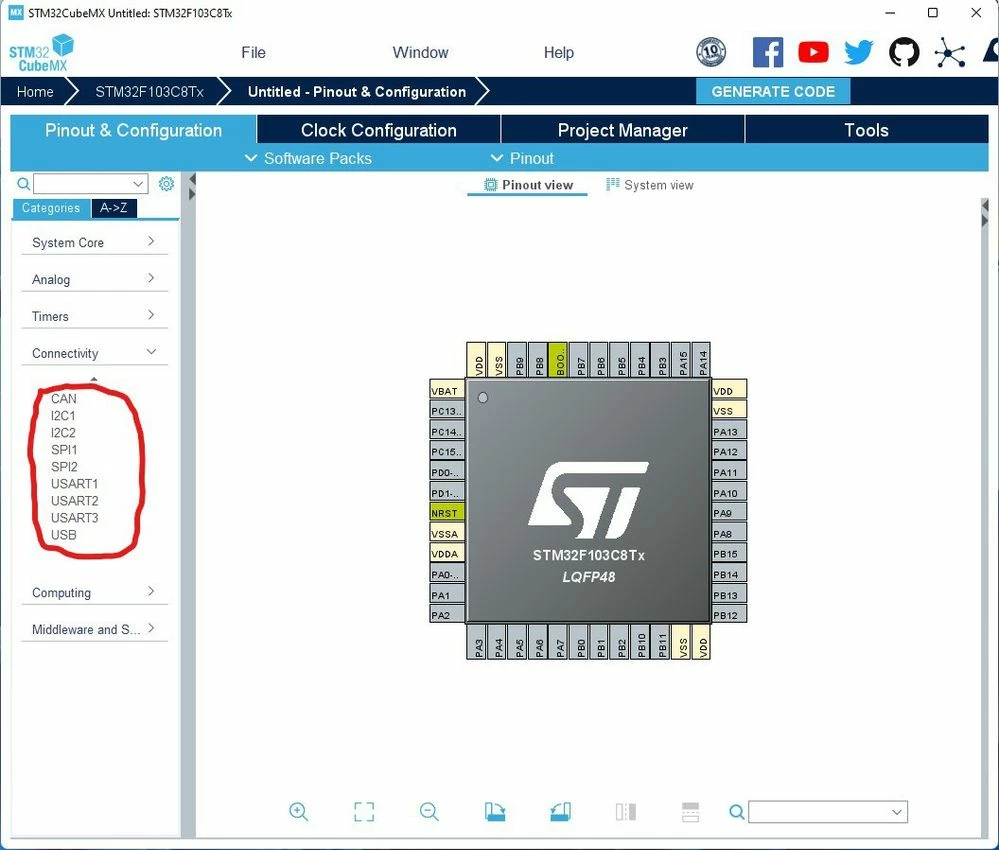

_legacyfs_online_stmicro_images_0693W00000biIGNQA2.pngAll examples use the SDIO interface for connection.

But I don't have this item in CubeMX. How can I mount an SD card

This topic has been closed for replies.
Best answer by PieterInHetBos

This version doesn't have SDIO. See the datasheet table 3 page 13 : https://www.st.com/resource/en/datasheet/stm32f103cb.pdf

Only the 64 or high has SDIO

4 replies

PieterInHetBos
PieterInHetBosBest answer
Associate II
April 18, 2023

This version doesn't have SDIO. See the datasheet table 3 page 13 : https://www.st.com/resource/en/datasheet/stm32f103cb.pdf

Only the 64 or high has SDIO

PieterInHetBos
Associate II
April 18, 2023

Btw it depens on your SD card but you may try SPI if possible

DMukh.2
DMukh.2Author
Associate
April 18, 2023

I could not find examples where the card is connected via SPI to work in Mass Storage mode

PieterInHetBos
Associate II
April 18, 2023

What kind of device do you use?

DMukh.2
DMukh.2Author
Associate
April 18, 2023

I use the BluePill board on STM32F103C8T6 and a microSd card with a 1G adapter

I want to make mass storage on an SD card for training

PieterInHetBos
Associate II
April 18, 2023

You can read up on SD cards and there layout: https://www.electroniccircuitsdesign.com/pinout/sd-microsd-card-pinout.html

D0 can be used as SDO and CMD can be used as SDI, DAT3 is CS.

Please know that datarates are far slower dan SDIO.