
Associate III
June 2, 2025
Question

NUCLEO-C071RB - IAR "Non-recognized options in project file" during debugging

  • June 2, 2025
  • 2 replies
  • 946 views

Hi,

Can you please help me for below  

I am using NUCLEO-C071RB development board ,I am generating the code using CUBE MX software(V6.14.1) following steps I have followed 

Step 1:Selected the board as NUCLEO-C071RB

Step 2:From project manager I have selected the Toolchain/IDE as EWARM and other configuration as below 
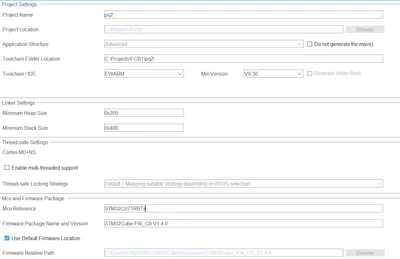
curiocity_1-1748855996589.png

Step 3:Clicked on generate code 

Step 4:a .eww file is generated and I opened the file using IAR software the code builds completly without erros but, I am getting the following notification during opening of file 
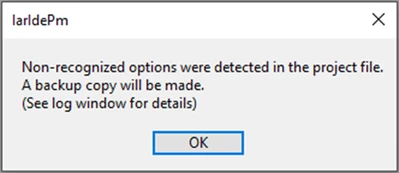
curiocity_2-1748856135172.png

Step 5:The code builds ok with no error so now I have tried to debug that code it will not 

Step 6:I have right click on project and tried to look the core or device but it is not detected as below (the core should be Cortex MO+and there should be Device name 
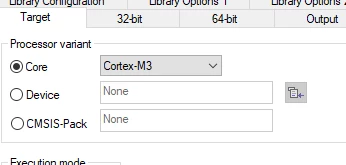
curiocity_3-1748856342426.png

My question is: Could there be an issue with the CubeMX IDE that's preventing it from detecting the STM32C071RBT6 microcontroller?

Step 7: I navigated to the ST folder in the IAR system, but I couldn't find any files related to the STM32C071RBT6. Why weren’t the files generated
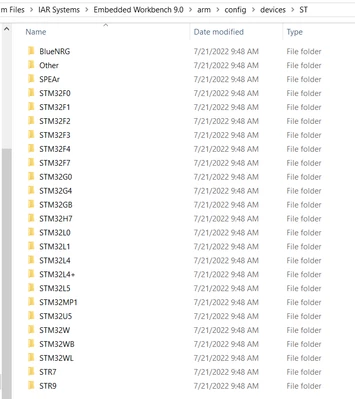
curiocity_4-1748856583217.png

Observation 2:

This issue never occurred when I was using the STM32F411RE with the NUCLEO-F411 development board.


Could you please help me to solve the issue 

2 replies

Andrew Neil
Super User
June 2, 2025

What EWARM version are you using?

On what host platform?


@curiocity wrote:

Step 4: a .eww file is generated and I opened the file using IAR software the code builds completely without errors but, I am getting the following notification during opening of file  


What do you mean by, "opening the file" here ?

A complex system that works is invariably found to have evolved from a simple system that worked.A complex system designed from scratch never works and cannot be patched up to make it work.
curiocityAuthor
Associate III
June 2, 2025

Hi Andrew,

Thanks for your reply

1.I am using IAR Embedded Workbench IDE-Arm 9.10.2 

2.Opening the file means that the generated .eww file is launched using IAR Embedded Workbench.

Andrew Neil
Super User
June 2, 2025

Thanks, but you didn't say what host - windows, linux, etc ?


@curiocity wrote:

2.Opening the file means that the generated .eww file is launched using IAR Embedded Workbench.


Your title says, "during debugging" - but that sounds like just initially opening the project file?


PS:

AndrewNeil_0-1748859635170.png

What did the log window say?

A complex system that works is invariably found to have evolved from a simple system that worked.A complex system designed from scratch never works and cannot be patched up to make it work.
Amel NASRI
Technical Moderator
June 2, 2025

Hi @curiocity ,

To make your toolchain support properly STM32C0, please apply the IDE patch that you find in STM32CubeC0 package under a path similar to STM32CubeC0/tree/main/Utilities/PC_Software/IDEs_Patches or directly from Github repository: STM32CubeC0/Utilities/PC_Software/IDEs_Patches.

-Amel

To give better visibility on the answered topics, please click on Accept as Solution on the reply which solved your issue or answered your question.
curiocityAuthor
Associate III
June 2, 2025

Hi Amel,

Thanks for your reply 

Ok I will try this