
Associate III
January 18, 2025
Solved

Nucleo H755ZI-Q: The interface firmware FAILED to reset/halt the target MCU

  • January 18, 2025
  • 3 replies
  • 2929 views

I am facing a persistent issue with the Nucleo H755ZI-Q board that is driving me crazy! 

The issue I am having is : 

Error: Unable to get core ID

Error: No STM32 target found! If your product embeds Debug Authentication, please perform a discovery using Debug Authentication

Encountered Error when opening C:\ST\STM32CubeIDE_1.17.0\STM32CubeIDE\plugins\com.st.stm32cube.ide.mcu.externaltools.cubeprogrammer.win32_2.2.0.202409170845\tools\bin\STM32_Programmer_CLI.exe

Error in STM32CubeProgrammer


MAIN ISSUE.jpg


Here's the setup and steps I've followed:

  1. Chip Configuration:

    • Selected STM32H755ZIT6 in STM32CubeMX.
    • Disabled HSE and enabled LSE with a crystal resonator.
    • Set M7 clock to 400 MHz and M4 clock to 200 MHz.
    • Power settings:
      • Supply source: PWR_DIRECT_SMPS_SUPPLY.
      • Power regulator voltage scale: 1.


MX4.jpg


CLOCK.jpg


  1. Peripheral Configuration:

    • I2C1: PB8, PB9.
    • USART1: PB14, PB15.
    • USART2: PA2, PA3.
    • Configured GPIO for onboard LEDs and user switch.


MX5.jpgMX3.jpgMX2.jpg


2. Debug Configuration:


And, Beside the MCU not able to finding it's target, after restarting  the device I receive this, 

The interface firmware FAILED to reset/halt the target MCU

I’ve rechecked the configurations multiple times and followed the guidelines for debugging and clock setup. Despite all efforts, the issue persists. 

My Steps to Troubleshoot So Far:

  • Verified all clock and peripheral settings in CubeMX.
  • Double-checked debug settings.
  • Ensured all pins are correctly configured.
  • Re-Update STlink V3 [HSI-8Mhz] 
  • Deleted the H7 package and re-downloaded it
  • Uninstalled CubeIDE and re-installed it. 


I've lost the counts how many times I have factory reset my MCU. I’d greatly appreciate any guidance or solutions to resolve this issue. Could it be related to the power supply settings, debug interface, or something else entirely?

@TDK  @Tesla DeLorean @Sara BEN HADJ YAHYA  @mƎALLEm 

Best answer by mƎALLEm

Hello @Daniel_Ismail ,

The issue is due to a limitation in the new CubeMx version described in this thread. Refer to the solution.

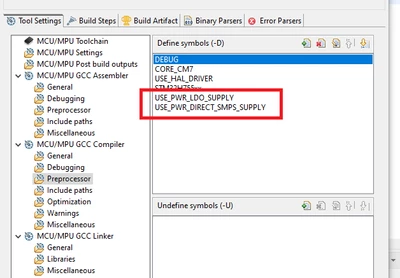
Two defines of the power configs are generated by CubeMx for the same project:

SofLit_0-1737366862401.png

You need to remove the define USE_PWR_LDO_SUPPLY from the project preprocessor and need to recover your board from the lock situation. Refer to the thread mentioned previously.

3 replies

Tesla DeLorean
Guru
January 18, 2025

Generally it relates to SMPS/VOS settings, but you indicate those are set suitably.

Other things could be how the cores start, or you've got something that interferes with PA13/PA14 debug pins. Make sure SWD/JTAG has not been disabled/suppressed via settings.

I'd probably solder a right-angle jumper on the BT0/VDD pins of the NUCLEO pin header, and perhaps add a spinning delay in the Reset_Handler() to permit the core to be wrestled by the ST-LINK.

Tips, Buy me a coffee, or three.. PayPal VenmoUp vote any posts that you find helpful, it shows what's working..
Associate III
January 18, 2025

The voltage settings are suitably configured, and I haven’t made any changes in MXCube beyond what I’ve already mentioned in my post. To clarify, I haven’t written any additional code either, so nothing has been done that would intentionally affect PA13/PA14.

Regarding the suggestion to solder a jumper on BT0/VDD, could you please explain the purpose of this modification? I’d also appreciate more details on how adding a spinning delay in the Reset_Handler() would help and how to implement it effectively.

Thanks in advance for your guidance!

Tesla DeLorean
Guru
January 18, 2025

The BT0 jumper allows for two things, it enters ROM System Loader rather than your code, which provides a safe harbour to erase your broken code running in FLASH. Also if the board is bricked by using LDO rather than SMPS you can power cycle the board completely twice with the jumper on to clear the issue.

nucleo144_boot0_jumper.jpg

With the delay in Reset_Handler you are buying time allowing the debug to wrestle control before your code gets to run fully and change pins, etc.

Reset_Handler PROC
 EXPORT Reset_Handler [WEAK]
 IMPORT SystemInit
 IMPORT __main

 movs r0, #0
delay subs r0, r0, #1
 bne.n delay

 LDR SP, =__initial_sp
				
 LDR R0, =SystemInit
 BLX R0
				
 LDR R0, =__main
 BX R0
				
 ENDP


Tips, Buy me a coffee, or three.. PayPal VenmoUp vote any posts that you find helpful, it shows what's working..
mƎALLEm
mƎALLEmBest answer
Technical Moderator
January 20, 2025

Hello @Daniel_Ismail ,

The issue is due to a limitation in the new CubeMx version described in this thread. Refer to the solution.

Two defines of the power configs are generated by CubeMx for the same project:

SofLit_0-1737366862401.png

You need to remove the define USE_PWR_LDO_SUPPLY from the project preprocessor and need to recover your board from the lock situation. Refer to the thread mentioned previously.

"To give better visibility on the answered topics, please click on ""Accept as Solution"" on the reply which solved your issue or answered your question."
Associate III
January 20, 2025

Thanks a bunch @mƎALLEm !That solution worked perfectly! I had spent days trying to resolve this issue, and this approach finally fixed it as expected. I'll also add the spinning as suggested by @Tesla DeLorean  delay to ensure the setup is even more robust. By the way, will the upcoming version include a fix for this issue?

mƎALLEm
Technical Moderator
January 20, 2025

@Daniel_Ismail wrote:

 By the way, will the upcoming version include a fix for this issue?


I don't have this visibility but most probably in the next release.

"To give better visibility on the answered topics, please click on ""Accept as Solution"" on the reply which solved your issue or answered your question."
mƎALLEm
Technical Moderator
March 6, 2025

Issue fixed in CubeMx 6.14.0 (already available on ST website)

"To give better visibility on the answered topics, please click on ""Accept as Solution"" on the reply which solved your issue or answered your question."