
Visitor II
April 2, 2024
Question

pinout compatible couldn't load

  • April 2, 2024
  • 1 reply
  • 5868 views

Hi, all,

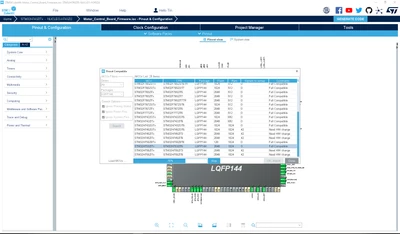
I am trying to port my preconfigured H743 Nucleo board pinout setting to H753ZI Nucleo board, which is pin to pin compatible. I clicked the "list compatible MCU" under the pinout tab, but for some reason, the window just stuck in the loading process forever. Please see the picture below:
 

TinNotTim_0-1712093557458.png

The progress stuck at exactly 70%, I can see the MCU I want, but I couldn't click on it because the loading is not done. Any idea on how I can fix this? Thanks for any suggestion in advance.

This topic has been closed for replies.

1 reply

STTwo-32
Technical Moderator
April 2, 2024

Hello @TinNotTim and welcome to the ST Community :smiling_face_with_smiling_eyes:.

I suggest you to restart your PC and try again.

Best Regards.

STTwo-32 

Visitor II
April 17, 2024

Hello,

same behaviour for me. At 70% it doesn't go ahead also restarting PC.

I'm using STM32CubeIDE
Version: 1.14.1
Build: 20064_20240111_1413 (UTC)

Actual microprocessor is STM32H563ZIT6.

STTwo-32
Technical Moderator
April 17, 2024

Hello @Maxer 

I've tested For the STM32H743ZITx:

STTwo32_0-1713336994127.png

and for the STM32H563ZIT6:

STTwo32_1-1713337149696.png

And it works fine. Please update your CubeMX to the last versions (V 6.11.0).

Best Regards.

STTwo-32