Solved
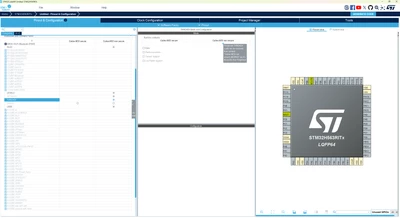
Popup saying that ThreadX can't be disabled is shown obscured
- November 19, 2025
- 1 reply
- 209 views
Dear STMicroelectronics,
This is a bug report on the UI for STM32CubeMX 6.16.0 running on Windows 11 Pro 25H2.
Please report this internally so that it may be fixed in some future version.
Steps to reproduce
- Start STM32CubeMX
- File / New Project
- Select MCU STM32H563RIT6
- Click button Start Project
- Select with TrustZone activated and click OK
- Under Categories, expand Middleware and Software Packs
- For ThreadX, click the greyed out radio button in column M33NS
- Click it again
Expected
The popup is readable.
Actual
After the second click, the popup is shown partially obscured by the table and is not readable.
If you select the row for ThreadX and click the radio button you can get the popup very much obscured - see attached screenshot.
Further info
The screen resolution doesn't seem to affect the behaviour.
I have also reproduced this problem when running the Linux variant of 6.15.0 on Debian bookworm.
Best regards, Jesper