
SAI Configuration with H7S3L8 / CubeIDE 1.18.0 / fw_h7rs_v1.2.0
STM32Cube IDE 1.18.0
fw : STM32Cube_FW_H7RS_V1.2.0
brd : NUCLEO-H7S3L8
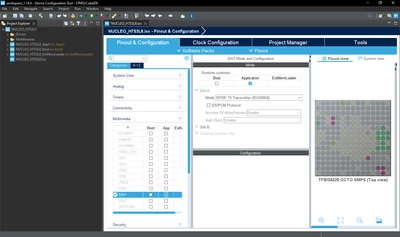
* main issue is :
Once project created : SAI configuration not provided in CubeMX after activation, therefore no setting can be adjusted in this section ( see picture )
This problem also appreared after migration from a similar project edited with cube 1.17.0 and implying SAI to 1.18.0 with STM32Cube_FW_H7RS_V1.2.0.
* other issue :
- C/C++ indexer errors popups appearing along while creating a new projet from scratch.
-> deleting workbench.xmi (as suggested as a workaround in found other post : https://community.st.com/t5/stm32cubeide-mcus/c-c-indexer-has-encountered-a-problem-1-11-2/td-p/84723 ) file located at : \STM32CubeIDE\workspace_1.18.0\.metadata\.plugins\org.eclipse.e4.workbench
-> rebuil index.
Thanks for your cooperation in resolving.