

Rick Hamilton
Associate III
November 12, 2025
Question

Starting a new project from a board NUCLEO-F767Zi

  • November 12, 2025
  • 7 replies
  • 543 views

Hi,

Using STM32CubeMX version 6.15.0

When I start a new project from the NUCLDO-F767ZI board I just get a blank chip, none of the component configuration at all, I tried it on two PC's both the same.
This used to work and was quite handy starting a new project.  At the moment I am going through a selection of processors so having to manually configure it before I can test it is a bit of a pain, any solutions?
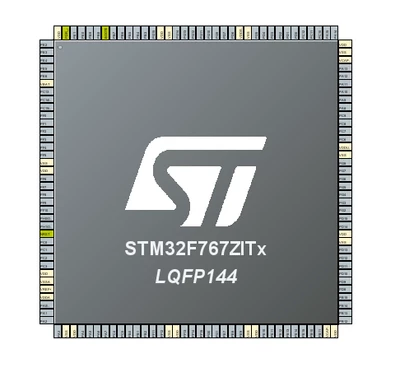
RickHamilton_0-1762946697548.png


7 replies

Ghofrane GSOURI
Technical Moderator
November 12, 2025

Hello @Rick Hamilton 

Could you please provide more details about your OS.

Please try to follow those steps:

- Close STM32CubeMX.

- Delete  the following folder .stm32cubemx  (On Windows: C:\Users\<YourUsername>\.stm32cubemx)

GhofraneGSOURI_0-1762949599238.png

- Restart CubeMX and try again

THX

Ghofrane

To give better visibility on the answered topics, please click on Accept as Solution on the reply which solved your issue or answered your question.
Rick Hamilton
Associate III
November 12, 2025

My main machine is Windows 11 Version 25H2 (OS Build 26200.7171)

The other machine I tried it on was Windows 10 Version 22H2 (OS Build 19045.6396)

I have been using cube 8 or 9 years im a full time developer.

Ghofrane GSOURI
Technical Moderator
November 12, 2025

Hello @Rick Hamilton 

Your long term experience with Cube and dedication as a full-time developer is truly delightful.

I just tested using windows 11 and CubeMX 6.15.0 and it's working correctly.

GhofraneGSOURI_0-1762950098105.png

Please try the workaround .I will be waiting for your feedback.

THX

Ghofrane 

To give better visibility on the answered topics, please click on Accept as Solution on the reply which solved your issue or answered your question.
Rick Hamilton
Associate III
November 12, 2025

Thank you for getting back, I have been using that workaround for a while, the fact it also did it on my old PC that I use as a backup and have not been developing on led me to post on the forum.

So as you asked, I deleted that directory, re-opened CubeMX and started a project from the NUCLEO-F767ZI and 

RickHamilton_0-1762951098997.png

Same result on both my PC's?
I also tried other processors and tried to start a project from an example some do work but most do not?  Very strange.   This was working 2 days ago, I started a project with NUCLEO-F722 and today its not working. 

Ghofrane GSOURI
Technical Moderator
November 12, 2025

Hello @Rick Hamilton 

Let's try to uninstall STM32CubeMX and reinstall it again.

Please use the following LINK to download it 


To give better visibility on the answered topics, please click on Accept as Solution on the reply which solved your issue or answered your question.
Rick Hamilton
Associate III
November 12, 2025

OK I uninstalled the Cube deleted all the directories, I then tried verson 6.13,0, and 6.14.1 and 6.15.0 none of them generated a project from a board.

I did the same on a Windows 10 machine, same result.

I then installed the Cube on my Windows 11 Lapop fresh install, and that does not work,

The Cube has stopped working!

Rick Hamilton
Associate III
November 12, 2025

I have been battling with the cube all week, Last week I abandoned a STM32U575 project because I can not get the cube to generate a USB stack, this is my living I need to be coding not fighting the tools.

Karl Yamashita
Principal
November 13, 2025

Just as @Ghofrane GSOURI , I am able to create a NUCLEO-F767ZI board project and have all the default peripherals initiated.


  1. Generate code as is and upload the IOC file.
  2. Do an OBS video capture of your steps when creating a new board project and upload the video.
If a reply has proven helpful, click on Accept as Solution so that it'll show at top of the post.CAN Jammer an open source CAN bus hacking toolCANableV3 Open Source
Ghofrane GSOURI
Technical Moderator
November 13, 2025

Hello @Rick Hamilton @Karl Yamashita 

As  requested @Karl Yamashita I am providing the IOC file along with a video recording of the steps I followed to create a new board project.

THX

Ghofrane

To give better visibility on the answered topics, please click on Accept as Solution on the reply which solved your issue or answered your question.
Rick Hamilton
Associate III
November 13, 2025

LOOK IT IS NOT DIFFICULT! It is not working for me, it stopped a couple of days ago

ezgif-22bac9ff1f9c6a00.gif

and I have been using this tool for years.

It does not work on my main PC, it does not work on my backup PC, and it does not work as a brand new install on my laptop.

Could it be my ST Account?


Ghofrane GSOURI
Technical Moderator
November 13, 2025

Hello @Rick Hamilton 

Let's try to Refresh Data 

GhofraneGSOURI_0-1763022082083.png


To give better visibility on the answered topics, please click on Accept as Solution on the reply which solved your issue or answered your question.
Rick Hamilton
Associate III
November 13, 2025

I have tried deleting the directory, refreshing the data uninstalling deleting the whole program file and installing it on a laptop as a fresh install.  P promise you I have tried every single option available.  The fact it is happening on 3 PC's would tend to suggest its not a local problem.

Just before posting this I re-tried "Refresh Data" and still the same on my PC and on a fresh install on my Laptop.

I have even tried going back a few versions of the cube.

The only thing in common with the 3 computers is my network connection and my ST Account.


Ghofrane GSOURI
Technical Moderator
November 13, 2025

Hello @Rick Hamilton 

Let's try using a different ST account.

To give better visibility on the answered topics, please click on Accept as Solution on the reply which solved your issue or answered your question.
Explorer
November 13, 2025

Thank you both for your assistance. 

I uninstalled STMCubeMX, I deleted all site data from Chrome, I created a new ST account and re-installed everything and it works.
If I repeat the process I did on the video you are right it does just create a blank processor because I did not select the board tab. 

The board tab stopped a few days ago so I think the original issue was the .stmcubemx directory then followed by my frustration of not being able to get it working.

Thanks again.