Associate
December 1, 2024
Solved

STM32 CubeMX - Generate Code fails on a Mac

  • December 1, 2024
  • 11 replies
  • 6783 views

Hi All

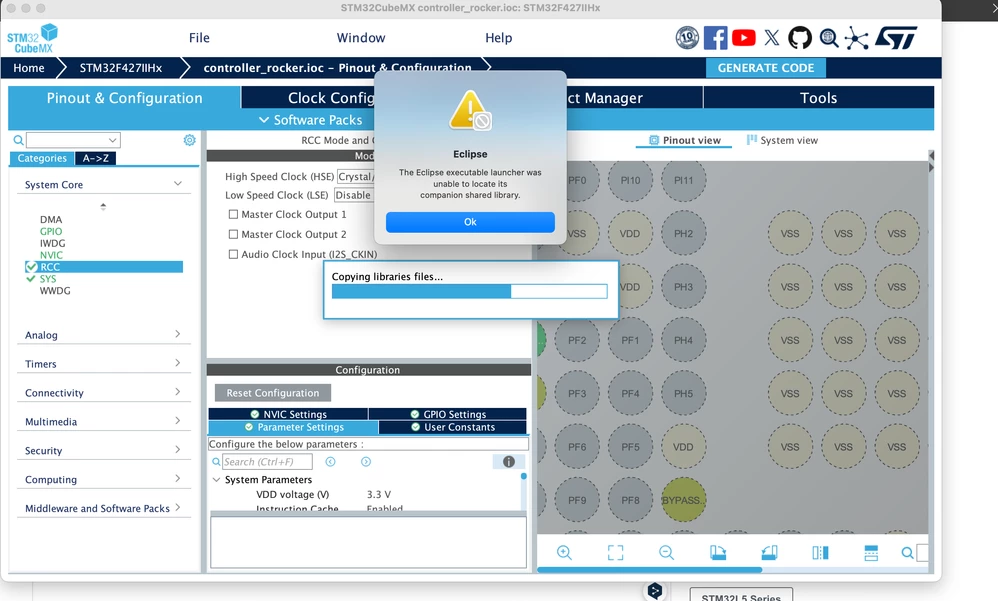
I have installed STM32 CubeMX on a Mac and I get the following error when trying to generate code:

The Eclipse executable launcher was unable to locate its companion shared library.截屏2024-12-01 18.42.46.png
Best answer by Semer CHERNI

Hello @chairdeng 

I am happy to announce the issue was fixed in STM32CubeMX.

You just need to download the installer form st.com and make a fresh install of STM32CubeMX 6.14.0.

KR,
Semer.

11 replies

Technical Moderator
December 2, 2024

Hello @chairdeng 

What version of macOS are you using?

KR,Souhaib

To give better visibility on the answered topics, please click on Accept as Solution on the reply which solved your issue or answered your question.
chairdengAuthor
Associate
December 3, 2024

I use 15.1.1截屏2024-12-04 01.40.00.png

Explorer
December 3, 2024

I encountered exactly the same issue. I’m trying to compile STM32 projects on a Mac using CubeMX and CLion, but every time I click “Generate Code” in CubeMX, it throws this error, causing CLion to fail to compile. It shows the message: “No project sources generated. Run Generate Code in CubeMX.” MacBook Air M1.

mƎALLEm
Technical Moderator
December 9, 2024

Same issue as this thread.

"To give better visibility on the answered topics, please click on ""Accept as Solution"" on the reply which solved your issue or answered your question."
Technical Moderator
December 9, 2024

Hello @chairdeng @zuojaing 

This could be an issue related to the unzipping of STM32CubeIDE.
Could you please try this command line that removes extended attributes in macOS:
xattr -c /Applications/STM32CubeIDE.app


KR, Souhaib

To give better visibility on the answered topics, please click on Accept as Solution on the reply which solved your issue or answered your question.
Associate
December 9, 2024

截屏2024-12-10 00.01.13.png

Hi, after following your solution and running sudo xattr - c/Applications/STM32CubeIDE.app on the terminal, the problem persists. Are there any other solutions?

*This post has been translated from Chinese to comply with the ST Community guidelines.

Technical Moderator
December 10, 2024

Could you try the same command line with ~/STM32CubeMX-6.13.0.app or try to uninstall CubeMX and reinstall it again and make sure to unzip the package using an official macOS® application such as the default graphical archive application, or the ditto tool in the command line:
$ditto -x -k setupArchive.zip

If the problem persists, please attach your IOC and log file to further investigate the issue.

To give better visibility on the answered topics, please click on Accept as Solution on the reply which solved your issue or answered your question.
Associate
December 11, 2024

When I uninstalled CubeMX and re-downloaded the CubeMX 6.13 installation package, both the macOS official extraction tool and the command sudo ditto -x -k en.stm32cubemx-mac-v6-13-0.zip ./STM32CubeMX failed to extract the file or reported an error: Couldn't read pkzip signature.

Technical Moderator
December 13, 2024

Hello,

This behavior is under investigation by development team and tracked by the Ticket 198693 (for internal follow-up) and that will be fixed as soon as possible.
STM32CubeIDE can be used for project generation on macOS 15.1 and 15.2 as a temporary solution.

KR,

Souhaib

To give better visibility on the answered topics, please click on Accept as Solution on the reply which solved your issue or answered your question.
Explorer II
December 29, 2024

Unfortunately, as written here before, going back to version 6.12.1 does not fix the situation. The work has stopped. Please give this problem priority time.

sirin
Associate II
January 3, 2025

Use Volume-Shared Virtual Machine applications (e.g. Parallels Desktop or something else) to run CubeMX on Windows to generate initial code might be a temporary workaround for this issue.

Screenshot 2025-01-03 at 3.08.33 PM.png

Semer CHERNI
ST Employee
January 3, 2025

Hello

We apologize for the issues created by the misbehavior of STM32CubeMX.
We are currently analyzing the root cause and we are given it high priority in order to provide a solution ASAP.

BR,
Semer.

bdill.1
Associate II
January 17, 2025

pse.equinox.launcher.cocoa.macosx.x86_64_1.2.800.v20231003-1442/eclipse_11802.so' (code signature in <66ADAB06-1B30-301C-8ECA-7EDC8C31724D> '/Applications/STMicroelectronics/STM32CubeMX.app/Contents/Resources/third_parties_plugins/binaries/STM32CubeIDE-MX-services/revA/pool/plugins/org.eclipse.equinox.launcher.cocoa.macosx.x86_64_1.2.800.v20231003-1442/eclipse_11802.so' not valid for use in process: mapping process and mapped file (non-platform) have different Team IDs)
2025-01-16 16:32:31.766 eclipse[6342:15132672] WARNING: Secure coding is not enabled for restorable state! Enable secure coding by implementing NSApplicationDelegate.applicationSupportsSecureRestorableState: and returning YES.


That's from the logs.... seems the most recent OSX requires a change/addition to the CubeMX

bdill.1
Associate II
January 20, 2025

This worked as a stop gap for me, from my terminal history after a fresh install of CubeMX:


sudo codesign --force --deep --sign - /Applications/STMicroelectronics/STM32CubeMX.app
sudo codesign --force --deep --sign - /Applications/STMicroelectronics/STM32CubeMX.app/Contents/MacOs
sudo codesign --force --deep --sign - /Applications/STMicroelectronics/STM32CubeMX.app/Contents/MacOs/STM32CubeMX
sudo codesign --force --deep --sign - /Applications/STMicroelectronics/STM32CubeMX.app/Contents/MacOs/jre
sudo codesign --force --deep --sign - /Applications/STMicroelectronics/STM32CubeMX.app/Contents/Info.plist
codesign -vvv /Applications/STMicroelectronics/STM32CubeMX.app
codesign -vvv /Applications/STMicroelectronics/STM32CubeMX.app/Contents/Info.plist
codesign -vvv /Applications/STMicroelectronics/STM32CubeMX.app/Contents/MacOs/STM32CubeMX
codesign -vvv /Applications/STMicroelectronics/STM32CubeMX.app/Contents/MacOs/jre
sudo spctl --add /Applications/STMicroelectronics/STM32CubeMX.app
sudo spctl --add /Applications/STMicroelectronics/STM32CubeMX.app/Contents/Info.plist
sudo spctl --add /Applications/STMicroelectronics/STM32CubeMX.app/Contents/MacOs/STM32CubeMX
sudo spctl --add /Applications/STMicroelectronics/STM32CubeMX.app/Contents/MacOs/jre
sudo spctl --enable /Applications/STMicroelectronics/STM32CubeMX.app
sudo spctl --enable /Applications/STMicroelectronics/STM32CubeMX.app/Contents/Info.plist
sudo spctl --enable /Applications/STMicroelectronics/STM32CubeMX.app/Contents/MacOs/STM32CubeMX
sudo spctl --enable /Applications/STMicroelectronics/STM32CubeMX.app/Contents/MacOs/jre

Then launch it:
/Applications/STMicroelectronics/STM32CubeMX.app/Contents/MacOS/STM32CubeMX
