

Avi Shukron
Associate
June 14, 2018
Question

STM32Cube: Generate code from command line with no GUI

  • June 14, 2018
  • 4 replies
  • 7358 views
Posted on June 14, 2018 at 17:59

Hi!

I have a project based on STM32. The project can be configured to run on several STM32 boards.

Each board configuration is represented by the `.ioc` file created by CubeMX.

I want to have a CI (Continuous Integration) setup that will compile the project for all supported boards.

In order to do this I created a Docker image with Java, STM32CubeMX and all the necessary toolchain.

Then I wrote a Cube command line script that generates the code given a `.ioc` file as an input.

I invoke this script as part of a Makefile using a line similar to this:

java -jar STM32CubeMX -q my_script

Since I passed the `-q` flag, I expected that no GUI will be presented.

The docker container crashes executing this line, since it does not have a display capabilities requested by CubeMX, even if it is not going to display anything.

I tried doing this on an actual machine without docker, but then sometimes I would get a popup window during the generation process that requires user intervention.

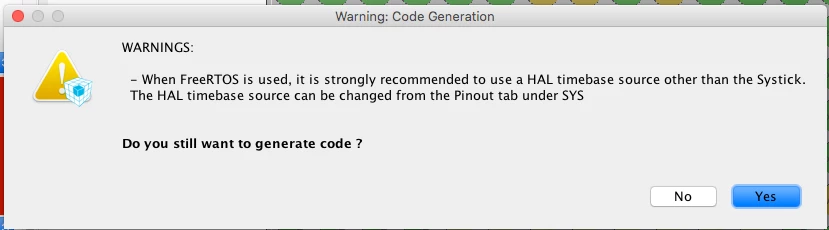
Such window might pop when you enable FreeRTOS and select SysTick as the HAL timebase source:
0690X0000060BfYQAU.png

This is a problem since the generation process is halted until the user presses a button, which is unacceptable for automated CI environment.

Is there a way to use Cube as a *true* CLI? I would rather it failed when encounter any problem, instead of waiting for user input.

Is such thing possible?

#stm32cubemx. #stme32-cube

4 replies

Asaf Kahlon
Visitor II
June 14, 2018
Posted on June 14, 2018 at 18:59

OMG this is the exact same problem I'm currently facing!!

I think it's trival to have a cli-only capabilities for the STM32CubeMX for people who like to have an automation process with this tool.

Pavel A.
Super User
June 14, 2018
Posted on June 14, 2018 at 23:39

IMHO what you want is abuse of CI. CubeMX should not be used this way. You change the CubeMX project (.ioc) only when something changes in hardware settings. These changes should be validated manually, sometimes manual changes and merges in the generated code are needed too. Once you do this manually for each needed IDE/toolkit, you check all generated projects into version control and then focus on writing the application code (which should be decoupled from the stuff generated by CubeMX.) When the app code changes, CI does its magic. But CubeMX is no longer involved.

-- pa

Asaf Kahlon
Visitor II
June 15, 2018
Posted on June 15, 2018 at 07:04

I don't agree that 'CubeMX should not be used this way' - why not? Just because it was built that way? It doesn't mean that's true.

I want to make sure my code always compiles, and for that I need to have the generated outputs from Cube. I don't believe in committing generated code to the repository, and I don't think that it's so hard to have a command to just generate the code from the current configuration. Many standard tools have support for working with CLI.

I agree with you that the process of changing the CubeMX project has to be done manually, but after the manual configuration is done, nothing should be on my way when I want to create an automation routine. The configuration file should be enough for generating the code. I can agree that warnings should be popped-up, but a flag for generating anyway should be supported too...

Vitaliy Chernobay
Senior
June 14, 2018
Posted on June 14, 2018 at 21:18

it will probably be useful

https://community.st.com/0D50X00009XkXi7SAF

themole
Associate II
August 22, 2018

I have a very similar problem. As part of my CI process, I want to generate the documentation of a CubeMX project. Therefore, I installed CubeMX on my Jenkins host on command line, which worked like a charm, but when it comes to using CubeMX on command line, I always get the following error:

Exception in thread "main" java.awt.HeadlessException:
No X11 DISPLAY variable was set, but this program performed an operation which requires it.
 at java.awt.GraphicsEnvironment.checkHeadless(GraphicsEnvironment.java:204)
 at java.awt.Window.<init>(Window.java:536)
 at java.awt.Frame.<init>(Frame.java:420)
 at javax.swing.JFrame.<init>(JFrame.java:233)
 at com.st.microxplorer.maingui.MainFrame.<init>(MainFrame.java:53)
 at com.st.microxplorer.maingui.MicroXplorer.run(MicroXplorer.java:165)
 at com.st.microxplorer.maingui.STM32CubeMX.run(STM32CubeMX.java:24)
 at com.st.microxplorer.maingui.STM32CubeMX.main(STM32CubeMX.java:37)

This happens for the easiest possible script with only the exit command in.

Is there any possibility working around this problem?

EQurb.1
Visitor II
March 8, 2021

Have you found solution to this problem?

themole
Associate II
August 22, 2018

I SOLVED my problem with a workaround: I used xvfb to create a virtual X11 Display before executing CubeMX. This script helps to get it into background: https://gist.github.com/jterrace/2911875

Unfortunately, generate the PDF doc is not part of the scriptable commands... :(

ANath.1
Associate II
June 5, 2024

Hi @themole I am facing the same issue. Can you elaborate on your solution or share some reference? Thanks