
Visitor II
March 6, 2025
Question

STM32CubeMX shows conflicts for STM32F3348-DISCO

  • March 6, 2025
  • 2 replies
  • 535 views

Hello,

I am working on a project for the STM32F3348-DISCO board using STM32 IDE 1.18.0.

I have created a new project with the following settings:

- Target Reference: STM32F3348-DISCO

- Firmware Package Name and Version: STM32Cube FW_F3 v1.11.5

- Initialize all peripherals with their default Mode ?  Yes


STM32CubeMX shows there are multiple conflicts with the default configuration.
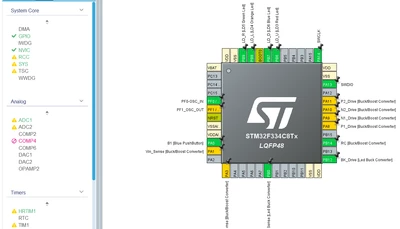
Sati_0-1741290299579.png


Do you have any suggestions on how to resolve these issues?

2 replies

TDK
Super User
March 6, 2025

Hover over the things to see why they are red or have the exclamation point. They typically indicate a peripheral cannot be enabled due to a pin already in use, but they do not indicate an error or something that needs addressed.

I don't see any conflicts here.

"If you feel a post has answered your question, please click ""Accept as Solution""."
STTwo-32
Technical Moderator
March 6, 2025

Hello @Sati and welcome to the St Community.

To have all pins available you need to click pinout and clear the current pinout configuration. On a discovery board, some of the pins are directly mapped to a led, a button,… so, if you set it to the default configuration, some pins will be set for led, push button,…what will create conflict with other peripherals that use the same pins.

Best Regards.

STTwo-32